Skip to content

Instantly share code, notes, and snippets.

View pchemguy's full-sized avatar

PChemGuy pchemguy

View GitHub Profile
@pchemguy
pchemguy / Antigravity_Windows_AI_Setup_2026.md
Created October 6, 2026 18:40 — forked from to-your-now/Antigravity_Windows_AI_Setup_2026.md
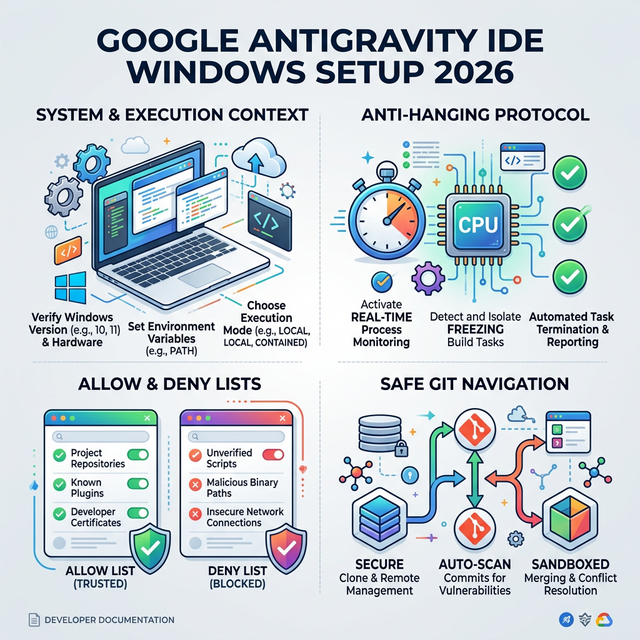
The Perfect Setup for Google Antigravity IDE on Windows (2026)

Infographic

The Perfect Setup for Google Antigravity IDE on Windows (2026 Edition)

If you are using Google’s Antigravity IDE on Windows to power autonomous AI agents, you’ve likely encountered terminal hanging, broken token parsing, and endless execution loops. Agents natively default to Unix-style thinking, struggling with pwsh, file path escapes, and the IDE's internal CLI safeguards.

This guide provides the Absolute AI System Prompt (gemini.md) and the Optimal IDE Settings (Allow/Deny lists) to transform your Windows environment into a flawlessly stable workspace for any LLM agent.


@pchemguy
pchemguy / llm-wiki.md
Created May 10, 2026 21:12 — forked from rohitg00/llm-wiki.md
LLM Wiki v2 β€” extending Karpathy's LLM Wiki pattern with lessons from building agentmemory

LLM Wiki v2

A pattern for building personal knowledge bases using LLMs. Extended with lessons from building agentmemory, a persistent memory engine for AI coding agents.

This builds on Andrej Karpathy's original LLM Wiki idea file. Everything in the original still applies. This document adds what we learned running the pattern in production: what breaks at scale, what's missing, and what separates a wiki that stays useful from one that rots.

What the original gets right

The core insight is correct: stop re-deriving, start compiling. RAG retrieves and forgets. A wiki accumulates and compounds. The three-layer architecture (raw sources, wiki, schema) works. The operations (ingest, query, lint) cover the basics. If you haven't read the original, start there.

@pchemguy
pchemguy / llm-wiki.md
Created May 9, 2026 19:52 — forked from karpathy/llm-wiki.md
llm-wiki

LLM Wiki

A pattern for building personal knowledge bases using LLMs.

This is an idea file, it is designed to be copy pasted to your own LLM Agent (e.g. OpenAI Codex, Claude Code, OpenCode / Pi, or etc.). Its goal is to communicate the high level idea, but your agent will build out the specifics in collaboration with you.

The core idea

Most people's experience with LLMs and documents looks like RAG: you upload a collection of files, the LLM retrieves relevant chunks at query time, and generates an answer. This works, but the LLM is rediscovering knowledge from scratch on every question. There's no accumulation. Ask a subtle question that requires synthesizing five documents, and the LLM has to find and piece together the relevant fragments every time. Nothing is built up. NotebookLM, ChatGPT file uploads, and most RAG systems work this way.

Beast Mode

Beast Mode is a custom chat mode for VS Code agent that adds an opinionated workflow to the agent, including use of a todo list, extensive internet research capabilities, planning, tool usage instructions and more. Designed to be used with 4.1, although it will work with any model.

Below you will find the Beast Mode prompt in various versions - starting with the most recent - 3.1

Installation Instructions

  • Go to the "agent" dropdown in VS Code chat sidebar and select "Configure Modes".
  • Select "Create new custom chat mode file"
@pchemguy
pchemguy / win10colors.cmd
Created October 11, 2025 05:28 — forked from mlocati/win10colors.cmd
ANSI Colors in standard Windows 10 shell
@echo off
setlocal
call :setESC
cls
echo %ESC%[101;93m STYLES %ESC%[0m
echo ^<ESC^>[0m %ESC%[0mReset%ESC%[0m
echo ^<ESC^>[1m %ESC%[1mBold%ESC%[0m
echo ^<ESC^>[4m %ESC%[4mUnderline%ESC%[0m
@pchemguy
pchemguy / gist:f20365da94e2d9382fcb5c8d909bcc16
Created June 24, 2024 12:29 — forked from rxaviers/gist:7360908
Complete list of github markdown emoji markup

People

:bowtie: :bowtie: πŸ˜„ :smile: πŸ˜† :laughing:
😊 :blush: πŸ˜ƒ :smiley: ☺️ :relaxed:
😏 :smirk: 😍 :heart_eyes: 😘 :kissing_heart:
😚 :kissing_closed_eyes: 😳 :flushed: 😌 :relieved:
πŸ˜† :satisfied: 😁 :grin: πŸ˜‰ :wink:
😜 :stuck_out_tongue_winking_eye: 😝 :stuck_out_tongue_closed_eyes: πŸ˜€ :grinning:
πŸ˜— :kissing: πŸ˜™ :kissing_smiling_eyes: πŸ˜› :stuck_out_tongue:
@pchemguy
pchemguy / Zotero_MainDB.md
Last active July 11, 2026 03:09
Exploring Zotero Data Model for Direct Database Access

Exploring Zotero Data Model for Direct Database Access

This tutorial aims to provide technical information necessary for direct access to data stored in Zotero's local bibliographic database. The official documentation [mentions][Zotero Client Data Model] the present topic briefly, so I decided to post a more detailed discussion.

Zotero's local bibliographic database is an [SQLite][] database, the leading open-source relational database management system (RDBMS). Hence, direct access to this data necessitates basic familiarity with [relational databases][RDBMS] and [SQL][] (free SQL resources are readily available on the Internet, including the [official documentation][SQLite docs] focused on the SQLite SQL dialect and [this tutorial][SQLite SQL Tutorial]).

Table of Contents

@pchemguy
pchemguy / sandbox.txt
Created April 19, 2024 08:40
Sandbox
Sandbox
layout default
author mattmc3
title Modern SQL Style Guide
revision 2019-01-17
version 1.0.1
description A guide to writing clean, clear, and consistent SQL.

Modern SQL Style Guide

@pchemguy
pchemguy / initialization.sql
Created July 5, 2022 05:15 — forked from jbrown123/-Recursive Queries Using Common Table Expressions.md
Creating arbitrary-depth recursive queries in SQLITE (works for any SQL compliant system) using CTEs (common table expressions)
DROP TABLE IF EXISTS users;
DROP VIEW IF EXISTS bp;
CREATE TABLE users (name, cn, title, manager);
CREATE VIEW bp AS
-- create a CTE (common table expression)
-- think of this as creating a temporary table that only exists during this query
-- works somewhat like CREATE TEMPORARY TABLE bosspath(cn, path)
WITH RECURSIVE bosspath(cn,path) AS
(