Skip to content

Instantly share code, notes, and snippets.

@karpathy
Created April 4, 2026 16:25
Show Gist options
  • Select an option

  • Save karpathy/442a6bf555914893e9891c11519de94f to your computer and use it in GitHub Desktop.

Select an option

Save karpathy/442a6bf555914893e9891c11519de94f to your computer and use it in GitHub Desktop.
llm-wiki

LLM Wiki

A pattern for building personal knowledge bases using LLMs.

This is an idea file, it is designed to be copy pasted to your own LLM Agent (e.g. OpenAI Codex, Claude Code, OpenCode / Pi, or etc.). Its goal is to communicate the high level idea, but your agent will build out the specifics in collaboration with you.

The core idea

Most people's experience with LLMs and documents looks like RAG: you upload a collection of files, the LLM retrieves relevant chunks at query time, and generates an answer. This works, but the LLM is rediscovering knowledge from scratch on every question. There's no accumulation. Ask a subtle question that requires synthesizing five documents, and the LLM has to find and piece together the relevant fragments every time. Nothing is built up. NotebookLM, ChatGPT file uploads, and most RAG systems work this way.

The idea here is different. Instead of just retrieving from raw documents at query time, the LLM incrementally builds and maintains a persistent wiki — a structured, interlinked collection of markdown files that sits between you and the raw sources. When you add a new source, the LLM doesn't just index it for later retrieval. It reads it, extracts the key information, and integrates it into the existing wiki — updating entity pages, revising topic summaries, noting where new data contradicts old claims, strengthening or challenging the evolving synthesis. The knowledge is compiled once and then kept current, not re-derived on every query.

This is the key difference: the wiki is a persistent, compounding artifact. The cross-references are already there. The contradictions have already been flagged. The synthesis already reflects everything you've read. The wiki keeps getting richer with every source you add and every question you ask.

You never (or rarely) write the wiki yourself — the LLM writes and maintains all of it. You're in charge of sourcing, exploration, and asking the right questions. The LLM does all the grunt work — the summarizing, cross-referencing, filing, and bookkeeping that makes a knowledge base actually useful over time. In practice, I have the LLM agent open on one side and Obsidian open on the other. The LLM makes edits based on our conversation, and I browse the results in real time — following links, checking the graph view, reading the updated pages. Obsidian is the IDE; the LLM is the programmer; the wiki is the codebase.

This can apply to a lot of different contexts. A few examples:

  • Personal: tracking your own goals, health, psychology, self-improvement — filing journal entries, articles, podcast notes, and building up a structured picture of yourself over time.
  • Research: going deep on a topic over weeks or months — reading papers, articles, reports, and incrementally building a comprehensive wiki with an evolving thesis.
  • Reading a book: filing each chapter as you go, building out pages for characters, themes, plot threads, and how they connect. By the end you have a rich companion wiki. Think of fan wikis like Tolkien Gateway — thousands of interlinked pages covering characters, places, events, languages, built by a community of volunteers over years. You could build something like that personally as you read, with the LLM doing all the cross-referencing and maintenance.
  • Business/team: an internal wiki maintained by LLMs, fed by Slack threads, meeting transcripts, project documents, customer calls. Possibly with humans in the loop reviewing updates. The wiki stays current because the LLM does the maintenance that no one on the team wants to do.
  • Competitive analysis, due diligence, trip planning, course notes, hobby deep-dives — anything where you're accumulating knowledge over time and want it organized rather than scattered.

Architecture

There are three layers:

Raw sources — your curated collection of source documents. Articles, papers, images, data files. These are immutable — the LLM reads from them but never modifies them. This is your source of truth.

The wiki — a directory of LLM-generated markdown files. Summaries, entity pages, concept pages, comparisons, an overview, a synthesis. The LLM owns this layer entirely. It creates pages, updates them when new sources arrive, maintains cross-references, and keeps everything consistent. You read it; the LLM writes it.

The schema — a document (e.g. CLAUDE.md for Claude Code or AGENTS.md for Codex) that tells the LLM how the wiki is structured, what the conventions are, and what workflows to follow when ingesting sources, answering questions, or maintaining the wiki. This is the key configuration file — it's what makes the LLM a disciplined wiki maintainer rather than a generic chatbot. You and the LLM co-evolve this over time as you figure out what works for your domain.

Operations

Ingest. You drop a new source into the raw collection and tell the LLM to process it. An example flow: the LLM reads the source, discusses key takeaways with you, writes a summary page in the wiki, updates the index, updates relevant entity and concept pages across the wiki, and appends an entry to the log. A single source might touch 10-15 wiki pages. Personally I prefer to ingest sources one at a time and stay involved — I read the summaries, check the updates, and guide the LLM on what to emphasize. But you could also batch-ingest many sources at once with less supervision. It's up to you to develop the workflow that fits your style and document it in the schema for future sessions.

Query. You ask questions against the wiki. The LLM searches for relevant pages, reads them, and synthesizes an answer with citations. Answers can take different forms depending on the question — a markdown page, a comparison table, a slide deck (Marp), a chart (matplotlib), a canvas. The important insight: good answers can be filed back into the wiki as new pages. A comparison you asked for, an analysis, a connection you discovered — these are valuable and shouldn't disappear into chat history. This way your explorations compound in the knowledge base just like ingested sources do.

Lint. Periodically, ask the LLM to health-check the wiki. Look for: contradictions between pages, stale claims that newer sources have superseded, orphan pages with no inbound links, important concepts mentioned but lacking their own page, missing cross-references, data gaps that could be filled with a web search. The LLM is good at suggesting new questions to investigate and new sources to look for. This keeps the wiki healthy as it grows.

Indexing and logging

Two special files help the LLM (and you) navigate the wiki as it grows. They serve different purposes:

index.md is content-oriented. It's a catalog of everything in the wiki — each page listed with a link, a one-line summary, and optionally metadata like date or source count. Organized by category (entities, concepts, sources, etc.). The LLM updates it on every ingest. When answering a query, the LLM reads the index first to find relevant pages, then drills into them. This works surprisingly well at moderate scale (~100 sources, ~hundreds of pages) and avoids the need for embedding-based RAG infrastructure.

log.md is chronological. It's an append-only record of what happened and when — ingests, queries, lint passes. A useful tip: if each entry starts with a consistent prefix (e.g. ## [2026-04-02] ingest | Article Title), the log becomes parseable with simple unix tools — grep "^## \[" log.md | tail -5 gives you the last 5 entries. The log gives you a timeline of the wiki's evolution and helps the LLM understand what's been done recently.

Optional: CLI tools

At some point you may want to build small tools that help the LLM operate on the wiki more efficiently. A search engine over the wiki pages is the most obvious one — at small scale the index file is enough, but as the wiki grows you want proper search. qmd is a good option: it's a local search engine for markdown files with hybrid BM25/vector search and LLM re-ranking, all on-device. It has both a CLI (so the LLM can shell out to it) and an MCP server (so the LLM can use it as a native tool). You could also build something simpler yourself — the LLM can help you vibe-code a naive search script as the need arises.

Tips and tricks

  • Obsidian Web Clipper is a browser extension that converts web articles to markdown. Very useful for quickly getting sources into your raw collection.
  • Download images locally. In Obsidian Settings → Files and links, set "Attachment folder path" to a fixed directory (e.g. raw/assets/). Then in Settings → Hotkeys, search for "Download" to find "Download attachments for current file" and bind it to a hotkey (e.g. Ctrl+Shift+D). After clipping an article, hit the hotkey and all images get downloaded to local disk. This is optional but useful — it lets the LLM view and reference images directly instead of relying on URLs that may break. Note that LLMs can't natively read markdown with inline images in one pass — the workaround is to have the LLM read the text first, then view some or all of the referenced images separately to gain additional context. It's a bit clunky but works well enough.
  • Obsidian's graph view is the best way to see the shape of your wiki — what's connected to what, which pages are hubs, which are orphans.
  • Marp is a markdown-based slide deck format. Obsidian has a plugin for it. Useful for generating presentations directly from wiki content.
  • Dataview is an Obsidian plugin that runs queries over page frontmatter. If your LLM adds YAML frontmatter to wiki pages (tags, dates, source counts), Dataview can generate dynamic tables and lists.
  • The wiki is just a git repo of markdown files. You get version history, branching, and collaboration for free.

Why this works

The tedious part of maintaining a knowledge base is not the reading or the thinking — it's the bookkeeping. Updating cross-references, keeping summaries current, noting when new data contradicts old claims, maintaining consistency across dozens of pages. Humans abandon wikis because the maintenance burden grows faster than the value. LLMs don't get bored, don't forget to update a cross-reference, and can touch 15 files in one pass. The wiki stays maintained because the cost of maintenance is near zero.

The human's job is to curate sources, direct the analysis, ask good questions, and think about what it all means. The LLM's job is everything else.

The idea is related in spirit to Vannevar Bush's Memex (1945) — a personal, curated knowledge store with associative trails between documents. Bush's vision was closer to this than to what the web became: private, actively curated, with the connections between documents as valuable as the documents themselves. The part he couldn't solve was who does the maintenance. The LLM handles that.

Note

This document is intentionally abstract. It describes the idea, not a specific implementation. The exact directory structure, the schema conventions, the page formats, the tooling — all of that will depend on your domain, your preferences, and your LLM of choice. Everything mentioned above is optional and modular — pick what's useful, ignore what isn't. For example: your sources might be text-only, so you don't need image handling at all. Your wiki might be small enough that the index file is all you need, no search engine required. You might not care about slide decks and just want markdown pages. You might want a completely different set of output formats. The right way to use this is to share it with your LLM agent and work together to instantiate a version that fits your needs. The document's only job is to communicate the pattern. Your LLM can figure out the rest.

@wsir78933-rgb

Copy link
Copy Markdown

As a DM who loves running complex tactical encounters, I used to spend hours sketching out maps and troop movements on paper before every session. Finding Army Formation Creator completely changed my prep workflow. It is such a handy, free online tool for setting up D&D battlefields, positioning monsters and siege weapons, and mapping out ambushes. The best part is being able to export a clean, high-resolution image to share directly with my players so everyone is on the same page before rolling initiative. Highly recommended for any table-top RPG gamemaster!

@wsir78933-rgb

Copy link
Copy Markdown

While exploring this brilliant LLM wiki concept and organizing my research notes, I realized that high-quality visuals are just as important for documentation and presentations. If you are also building knowledge bases or working on content creation, you should definitely check out Retouchia. It is a fantastic free AI image editor that helped me instantly remove backgrounds, upscale old diagrams to crisp 4K, and polish my project visuals in seconds without any complex software. Highly recommended for creators and developers!

@ya2080

ya2080 commented Oct 14, 2026 •

Copy link
Copy Markdown

This really resonates with me. One of the biggest problems I’ve found with LLMs is that they can generate useful information much faster than we can actually absorb and retain it.

That’s exactly the problem I built Eigma around: turning useful conversations into a structured, visual wiki, then bringing important ideas back through spaced review.

https://eigma.app/

ChatGPT Plugin:
https://chatgpt.com/plugins/plugin_asdk_app_6aa2cbe43cf481918d7e898329bf2dd6

hero-globe-poster

@sassarini-marco

Copy link
Copy Markdown

We built on this idea and measured one thing that might be useful to others here: in our implementation, most LLM calls during ingest weren't writing but deciding (which folder, same subject as an existing note, merge or not, what to link). Those decisions took about 72% of the LLM tokens.

Handing them to a small typed classifier and keeping the LLM for the text, the right note reached the answer in 89% of asks vs 62%, on 525 documents, with ingest in about half the time and token cost per document flat as the wiki grew. One corpus and one model, so take it as a first data point. Paper: https://doi.org/10.5281/zenodo.22898752. Code (AGPL-3.0, works with Ollama): https://github.com/crow-hq/llm-wiki-v2. uvx llmwiki2 demo opens an example wiki with no key.

@frankchu91

Copy link
Copy Markdown

MindBase 0.4.6 — four more things from this thread, now computed instead of guessed

Follow-up to my September comment. Each item below is a direct response to something said here in the last month:

  • @gowtham0992's lnk stale — the memory that names a file git no longer has. MindBase now computes broken citation (a page cites a [@path] that was moved or deleted) and broken link (a [[wikilink]] with no page or note behind it) in code at lint time. No model involved, so no false "I think this might be missing".
  • @crajah's point that the assembler between retriever and model silently drops anything over the per-channel budget, and that recall@k can't see it. Every answer now reports it: read 3 pages · 9.1k of 14.2k chars fit · clipped: deep-work.md. One line, and the whole failure class is visible.
  • @HagaiHen's "extend, don't create" — near-duplicate pages are the default failure. near duplicate pairs research pages whose names are the same concept; the maintainer is told to extend one instead of keeping both.
  • @XBlueSky's "capture pipelines should fail open" — free text is written to your daily file before the model is called, and if the model then fails the error says exactly where your text is.

Also: every query is now appended to logs/<date>.md with pages read vs. pages cited, so "the wiki had it and the model ignored it" is greppable after the fact. (The gist's log is supposed to cover all three operations; most implementations, mine included until now, only logged ingests.)

Repo (MIT): https://github.com/frankchu91/mindbase-llm-wiki · release notes: https://github.com/frankchu91/mindbase-llm-wiki/releases/tag/v0.4.6

@gavischneider

Copy link
Copy Markdown

I've been documenting the LLM Wiki methodology since May: Awesome LLM Wiki

New submissions are welcome, drop a PR!

@karlwirth

Copy link
Copy Markdown

I disagree. The wiki should not be memory for your agent. I think the wiki should be written for you, the person directing the agents, and that changes what goes in it.

When I run several agents at once, my problem is being overwhelmed and disorganized. Every session makes decisions and raises questions, and I can't reread the transcripts or the markdowns. A richer wiki makes that worse.

What I want is the agent writing down only what is significant: the decisions (who made them, when, and what we passed over), the open questions with an owner, and a summary of where things stand. If I handed the wiki to myself after amnesia or to an agent, could it rebuild to our current state and tell me all the significant things I need to pick up and continue? Anything that fails that test stays out.

The wiki should be for me to read, edit, think, get organized, and decide what comes next.

We built this as a free, MIT-licensed plugin for Claude Code and Codex, plain markdown in your repo: https://github.com/nimbalyst/nimbalyst-wiki

@nancyoliver704-lgtm

Copy link
Copy Markdown

Fascinating insight on building persistent, compounding knowledge bases with LLMs! Just as maintaining an organized, interlinked database ensures structured retrieval in software systems, systematic record-keeping is critical for public administration and legal institutions. For those managing public records, local government filings, or court services in Northern Virginia, the Loudoun County Courthouse in Leesburg serves as the primary hub for administrative and judicial operations.

@securityguy

Copy link
Copy Markdown

I wonder if the issue is that people are considering only one kind of "memory" for their agents? For task-based work, my agents use a kaban. They tag me if my action is required, and vice versa. They have a 90-day (default) database of all messages in case they need to find something specific. They have a RAG-like memory system that the agent can add to and remove from, but it is also updated in the background to ensure key information is stored and to clean up any conflicts. And finally, they have a folder for files that I also access over a file share. I'm considering making the latter a wiki, but also watching where things are moving with OKF. It might be nice if OKF could be accessed like a wiki by humans.

@gowtham0992

Copy link
Copy Markdown

Link 5.0 is out

Link is local memory for AI agents: plain Markdown files, review-gated writes, no LLM in the memory layer, one store shared by Claude Code, Codex, Cursor, Kiro, Windsurf, Zed, VS Code, Copilot, and Gemini.

5.0 is about one thing: memory that holds at the moment the agent acts. Every memory system I have used, mine included, ends at "the agent was told". The agent reads the brief, agrees, and forty minutes later force-pushes anyway. This release moves the memory from the brief to the tool call.

What's new:

  • Reviewed memories can enforce rules. A memory can carry enforce rules - ask command: git push --force*, deny write: migrations/**, ask read: .env - checked before the agent's shell commands and file reads and writes (Claude Code; shell commands in Cursor). ask waits for your OK, deny blocks, and every decision names the memory it came from. The agent cannot touch the switch: over MCP it cannot mark a rule-bearing memory reviewed, clear its rules, archive, forget or update it, and while a rule is active the hook asks before an agent runs Link's own governance commands or edits the memory files directly. Commands are read the way the shell runs them - every command in a &&/;/| chain, inside bash -c, eval, $( ), past sudo/env/timeout, with /usr/bin/git read as git - and quoted text such as a commit message is not a command. What the reader cannot see (variables expanded at run time, a script that does the forbidden thing inside) it does not claim to. Measured: 17 of 17 forbidden calls caught in their disguises, 0 of 34 ordinary coding-agent calls stopped, 0.149 ms per decision (p95), no model.

  • lnk stale now checks almost everything a memory can name. 3.0 questioned a memory only when it named a file git no longer has. It now notices package scripts, make and just targets, dependencies, environment variables, URLs, a runtime version the manifests no longer allow ("Python 3.10" when pyproject requires >=3.12), and a package manager whose lockfile was replaced. Memories about code are anchored to the lines they describe (path:line symbol, found by reading the file, not by a model), so a function deleted or renamed while its file stayed is caught too. The precision rule is unchanged - a reference is reported only when history shows the thing existed - and it held: 0 false flags across 345 references in Link's own docs and 298 across eight other real repositories, every planted deletion caught. Recall carries the verdict: each returned memory says verified (with the commit) or stale_paths (with evidence), so the agent is told rather than left to trust.

  • The same check runs on AGENTS.md, CLAUDE.md and friends. lnk stale --instructions reads the instruction files every session loads and reports a script, target, dependency, variable or version the repository removed, a file past Codex's or Windsurf's size limit, and two files that contradict each other. On eight public repositories with three years of history, 604 checkable references, every finding judged by hand: one AGENTS.md 5,473 bytes past the Codex limit, a few guidance findings, no false ones. lnk compile goes the other way: it writes reviewed memory into those same files as a delimited block, with path-scoped rules for Cursor, Claude Code and Copilot, so a project's standing rules reach agents that have no hooks at all. --check fails CI on drift.

  • A receipt for every session. People could not see what their agent was actually given. lnk receipt groups the local ledger into sessions: the brief (memories, tokens, whether it was cut to fit), recalls, every memory the agent saw and how often, and now the rule checks (asked, blocked) and code reminders. Everything a hook injects carries a short marker, and the session-end hook checks the transcript, so the receipt says whether the brief arrived, arrived cut off, or never arrived. Building it exposed two recording gaps in my own ledger - the session-start hook never recorded the brief it delivered, and "never retrieved" counted memories agents had read over MCP. Both fixed.

  • The current claim ranks first. When a fact changed two or three times, recall used to be able to return the old one. Revisions that name what they replaced ("moved from 8080 to 8443") are recognised, the older of two contradicting results is labelled contradicted_by and read second, and point-in-time recall judges activity on the date asked about. A new claim-update slice (16 subjects, 36 versions, direct and paraphrased) was written after the ranking change and gated as a floor: with supersedes lineage a stale value comes back first 0.00 of the time, current value first 0.94. In the hygiene benchmark, contradiction exposure after a revision fell from 0.167 to 0 and point-in-time accuracy from 0.917 to 1.00.

  • Measured, shipped opt-in: contradiction flags from a local NLI model. An ~87 MB int8 model reads a new memory against the few stored memories about the same subject. Alone it is unusable - 107 false alarms on 216 unrelated pairs, it reads two different project rules as mutually exclusive half the time. With a 30% subject-overlap gate it raises 0 and adds exactly one revision the word rules miss. A small gain, so it is --nli opt-in, a review note and never a refusal, never on the recall path.

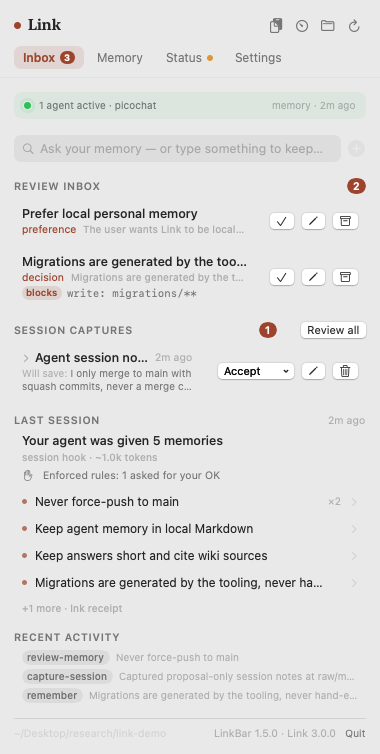
  • LinkBar 1.5. Before you approve a memory it shows the rules it will enforce, next to Approve. A Last session card shows what your agent was given, whether it arrived whole, and how many tool calls rules asked about or blocked. Its Status tab says plainly when hooks are not wired and rules are therefore not enforced.

LinkBar 1.5: the review inbox showing the rule a memory will enforce before you approve it, and the last session's receipt

Also in 5.0: memory works in any language on every surface (3.0's multilingual recall had not reached MCP or the viewer), standing preferences reach every session, recall packets are 13 to 22% smaller, team-sync goes through your review gate and retracts memories you forgot, secret scanning covers everything lnk sync pushes, lnk disconnect, MCP on Windows no longer hangs when Link runs git, and upgrading from 2.x is tested against a real 2.3 workspace.

# macOS, CLI + menu bar app
brew install --cask gowtham0992/link/linkbar
lnk setup

# CLI only (or Linux)
brew install gowtham0992/link/link
lnk setup

# already running Link
brew upgrade && lnk setup        # re-wires the hooks for enforced rules

# give a memory a rule
lnk remember "Never force-push to main" --enforce "ask command: git push --force*"

Still: every memory a plain file you can open, nothing durable without review, no LLM in the memory layer, CI blocks network code in the runtime.

Release notes: https://github.com/gowtham0992/link/releases/tag/v5.0.0

Repo: https://github.com/gowtham0992/link
Site: https://gowtham0992.github.io/link/
PyPI: https://pypi.org/project/link-mcp/
MCP: https://registry.modelcontextprotocol.io/?q=io.github.gowtham0992%2Flink
Benchmarks: https://github.com/gowtham0992/link/blob/main/benchmarks/RESULTS.md

@tuirk

tuirk commented Oct 26, 2026

Copy link
Copy Markdown

Kompl is a synthesis of the traditional wiki, which runs on clear rules and structure, and Karpathy's LLM wiki, where the model writes and maintains all of it. Local NLP and fixed rules keep the structure, and the model does the reading and writing.

Sources are compiled once into linked pages with numbered citations. When sources disagree, the page shows both sides. When a newer source overturns an older one, the page marks the claim as changed.

Your AI agent reads all of it over MCP.

One-minute demo: https://youtu.be/6zVYz6aHU1k

kompl-graph kompl-grid

Repo: https://github.com/tuirk/Kompl

A detailed walkthrough, with the literature background, is coming soon.

@NDOTO-G

NDOTO-G commented Oct 27, 2026

Copy link
Copy Markdown

@ShootJackal Hey, just saw this, sorry for the late reply. Thanks for checking it out.

Totally agree that a hash doesn't mean the info is right, just that nobody changed it. We found models pretty much never check on their own, so it has to be a script that does it. Sounds like you landed in the same spot with your quote checks.

One test you might find interesting: I took a markdown wiki built off this gist, made a doc.html copy, and changed one fact in both. The wiki's health check said everything was fine. The doc.html check flagged the exact sections I changed. When I asked models about it, the ones reading the markdown version all repeated the wrong fact. The ones reading the doc.html version all said something was off.

We've been running our agents' memory on doc.html since June and it's held up well. Corrections get added on, nothing gets overwritten.

If you ever want to try it against Cortex on the same notes I'd be down. Also curious why the summary index didn't work out for you, since doc.html leans on something similar.

Everything we've tested is here: https://dochtml.org/evidence.html

@felixhuangfei

felixhuangfei commented Oct 27, 2026 via email

Copy link
Copy Markdown

@ChavesLiu

ChavesLiu commented Oct 27, 2026 •

Copy link
Copy Markdown

Inspired by this idea, I built and open-sourced a lightweight implementation of LLM Wiki.

It provides a simple, functional foundation for automatic knowledge ingestion, wiki generation, cross-referencing, and natural language queries.

The goal is to make it easy for anyone to fork, customize, and build their own version.

Feedback and contributions are welcome!


🧠 Second Brain Skill

Build Your Own AI-Powered Second Brain

Inspired by Karpathy's LLM Wiki.
A lightweight, extensible foundation for building a continuously evolving knowledge base.

GitHub Stars GitHub Forks MIT License Claude Code Skill

中文 | English | 日本語 | Español | Français | 한국어 | Documentation | Quick Start


Overview

Second Brain Skill is an open-source implementation inspired by Andrej Karpathy's LLM Wiki concept.

It transforms scattered personal knowledge into a structured, interconnected, and continuously evolving wiki — enabling AI assistants to better understand and work with your accumulated context.

The project provides a minimal, functional, and extensible foundation that developers can easily fork, customize, and build upon to create their own second brain.

From Retrieval to Knowledge Accumulation

Traditional RAG behaves like an interpreter; Second Brain Skill takes a compiler-inspired approach.

While traditional RAG primarily retrieves relevant information at query time, Second Brain Skill uses LLMs to progressively transform raw materials into a structured wiki, maintaining relationships between sources, entities, and concepts.

Instead of repeatedly interpreting isolated documents, knowledge is organized, connected, and refined over time.

RAG retrieves knowledge. LLM Wiki builds knowledge.

You curate materials and ask good questions. The LLM handles the heavy lifting — summarization, cross-referencing, archiving, and consistency maintenance.

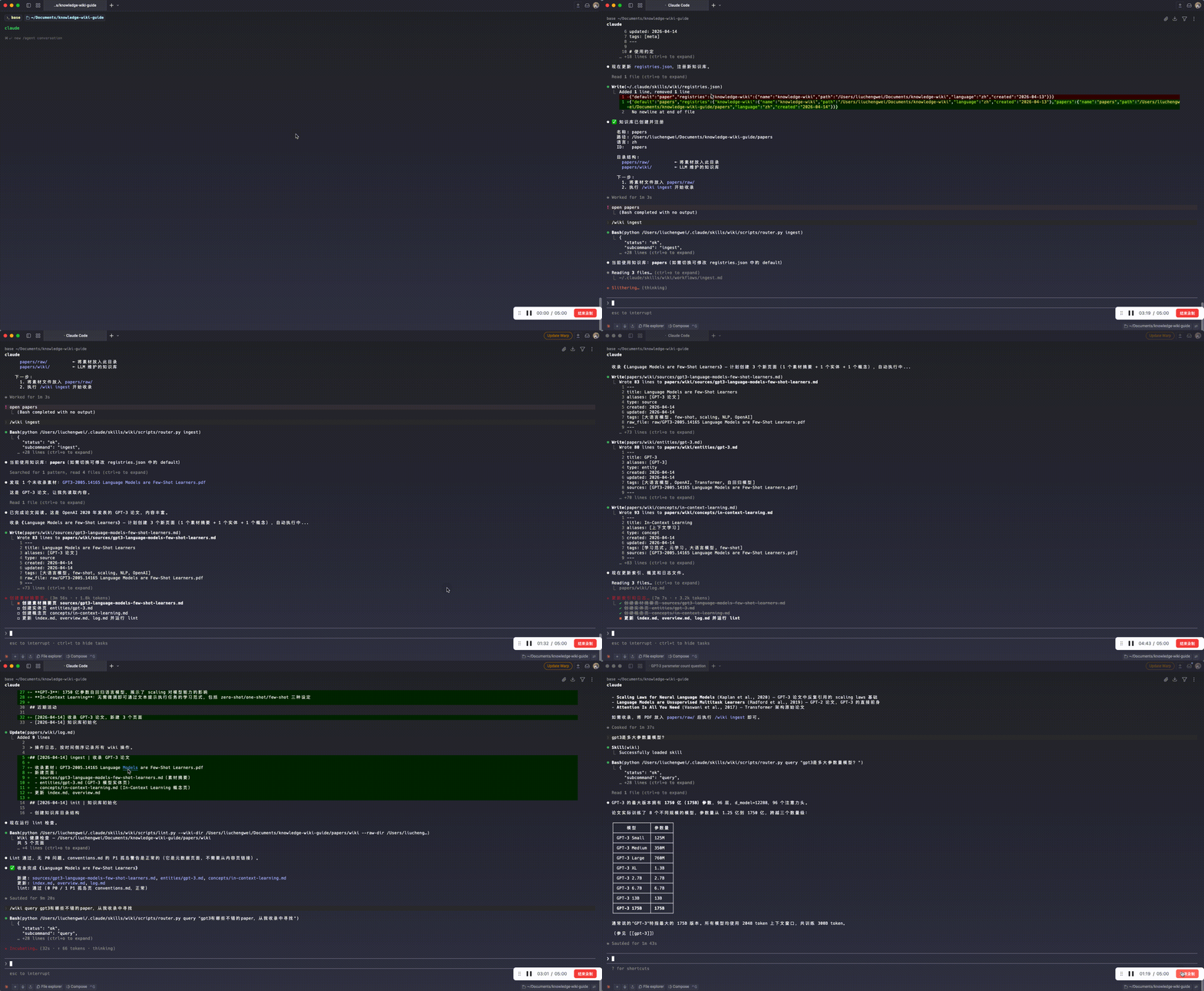
Demo

See how raw materials become a structured, interconnected knowledge base.

Demo: help → init → ingest → query full workflow

Three-Layer Architecture

Second Brain Skill separates raw materials, structured knowledge, and operating conventions into three layers.

Layer Location Writer Reader Contents
Raw Materials raw/ You LLM Papers, articles, notes, PDFs, images
Knowledge Base wiki/ LLM You Summaries, entities, concepts, analyses, cross-references
Spec Skill Co-evolve LLM SCHEMA, workflows, scripts

This separation keeps original materials intact while allowing the knowledge base and its operating conventions to evolve independently.

Quick Start

1. Install

# Clone the repository
git clone https://github.com/ChavesLiu/second-brain-skill.git

# Copy the Skill to Claude Code's global directory
cp -r second-brain-skill/skills/wiki ~/.claude/skills/wiki

# Install dependencies
pip install -r ~/.claude/skills/wiki/scripts/requirements.txt

2. Initialize a Knowledge Base

/wiki init

Follow the prompts to choose a path, name, and content language for your knowledge base. The initialization workflow currently defines zh (Chinese) and en (English) for generated wiki content; translated READMEs do not add support for other content languages.

3. Ingest Your First Material

# Place materials in the raw/ directory
cp my-article.md ~/my-kb/raw/

Then run:

/wiki ingest

The LLM automatically reads the material, generates summary pages, extracts entities and concepts, and maintains cross-references.

A single ingestion may create or update 10–15 interconnected wiki pages, depending on the material.

4. Query Your Knowledge

/wiki query What is Memex?

Or simply ask in natural language:

Compare the pros and cons of RAG vs Wiki approaches

The LLM uses your accumulated knowledge base to answer questions and connect relevant information.

Core Commands

Command Function
/wiki help Show available commands and usage instructions
/wiki init Create and register a new knowledge base
/wiki ingest Ingest new materials (Markdown, PDF, images)
/wiki query <question> Answer questions based on the knowledge base
/wiki lint Check knowledge base health and consistency
/wiki wipe Delete or reset wiki content pages (moved to wiki/.trash/; raw/ is unchanged)
/wiki test Run automated tests

Use /wiki wipe restore to recover deleted or reset content pages. /wiki wipe empty-trash permanently empties the recycle bin; afterward, only content already saved in Git history can be recovered through Git.

All commands also support natural language triggers.

For example, you can say "ingest this article", "check the knowledge base", or "summarize information about XX" without remembering specific commands.

Natural Language Mode

You don't need to memorize commands. The Skill automatically recognizes your intent and executes the corresponding workflow.

What you say Action taken
"Ingest this article" Ingest the material
"What is Memex?" Query the knowledge base
"Compare RAG and Wiki approaches" Retrieve and synthesize relevant knowledge
"Always cite sources in answers" Record the preference in conventions.md
"Check the knowledge base" Run a knowledge base health check

This approach also works well with conversational interfaces such as OpenClaw, allowing you to interact with your knowledge base naturally.

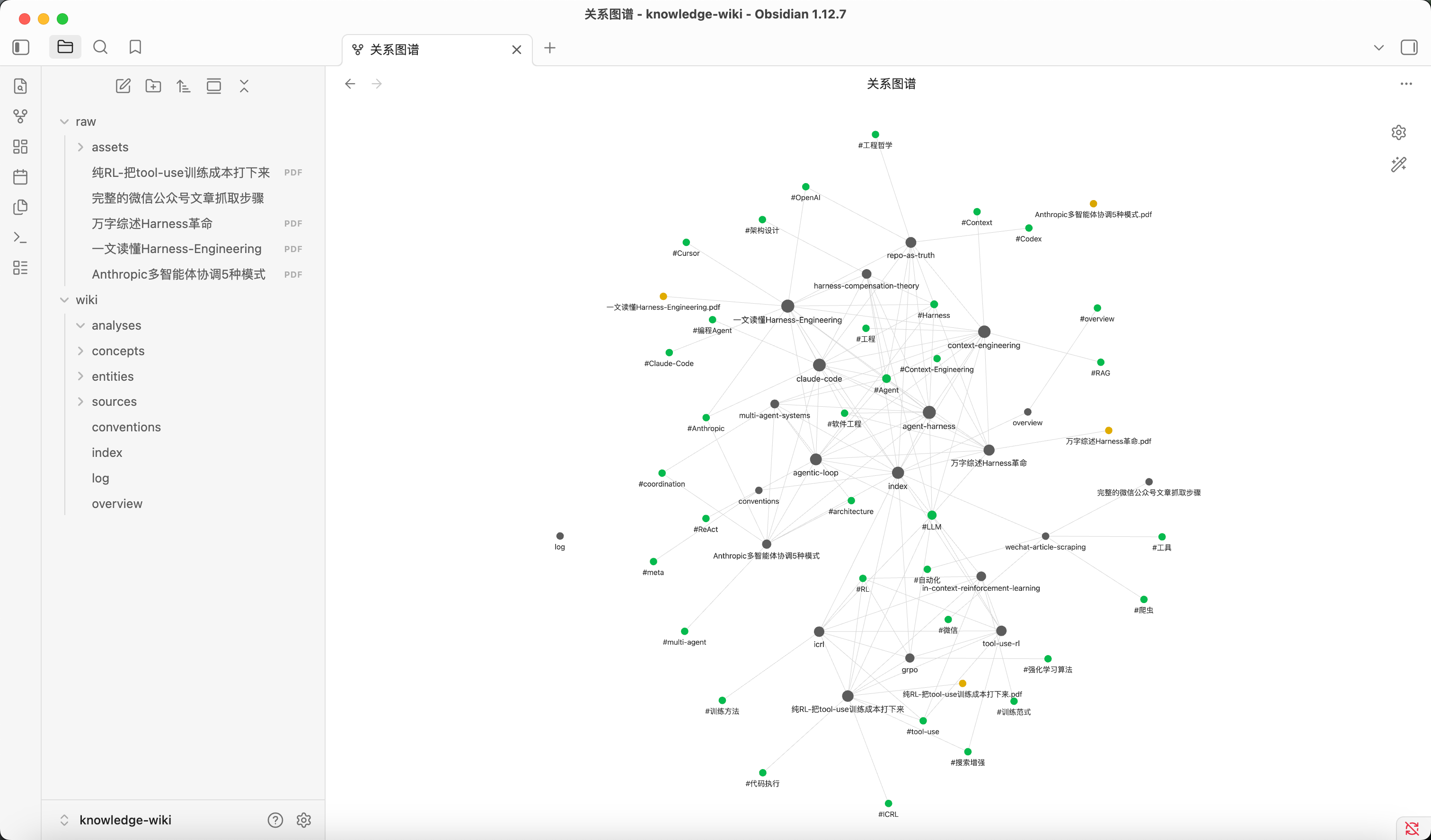
Obsidian Integration

Second Brain Skill generates a Markdown-based knowledge base that can be opened directly in Obsidian.

You can explore:

  • Knowledge graphs — Visualize relationships between entities and concepts.
  • Backlinks — Navigate interconnected knowledge pages.
  • Structured notes — Browse summaries, analyses, and source references.

Obsidian knowledge graph view

Recommended plugins:

  • Front Matter Title — Display Chinese titles on graph nodes (pre-configured).
  • Dataview — Query metadata using frontmatter.
  • Web Clipper — Clip web articles directly into raw/.

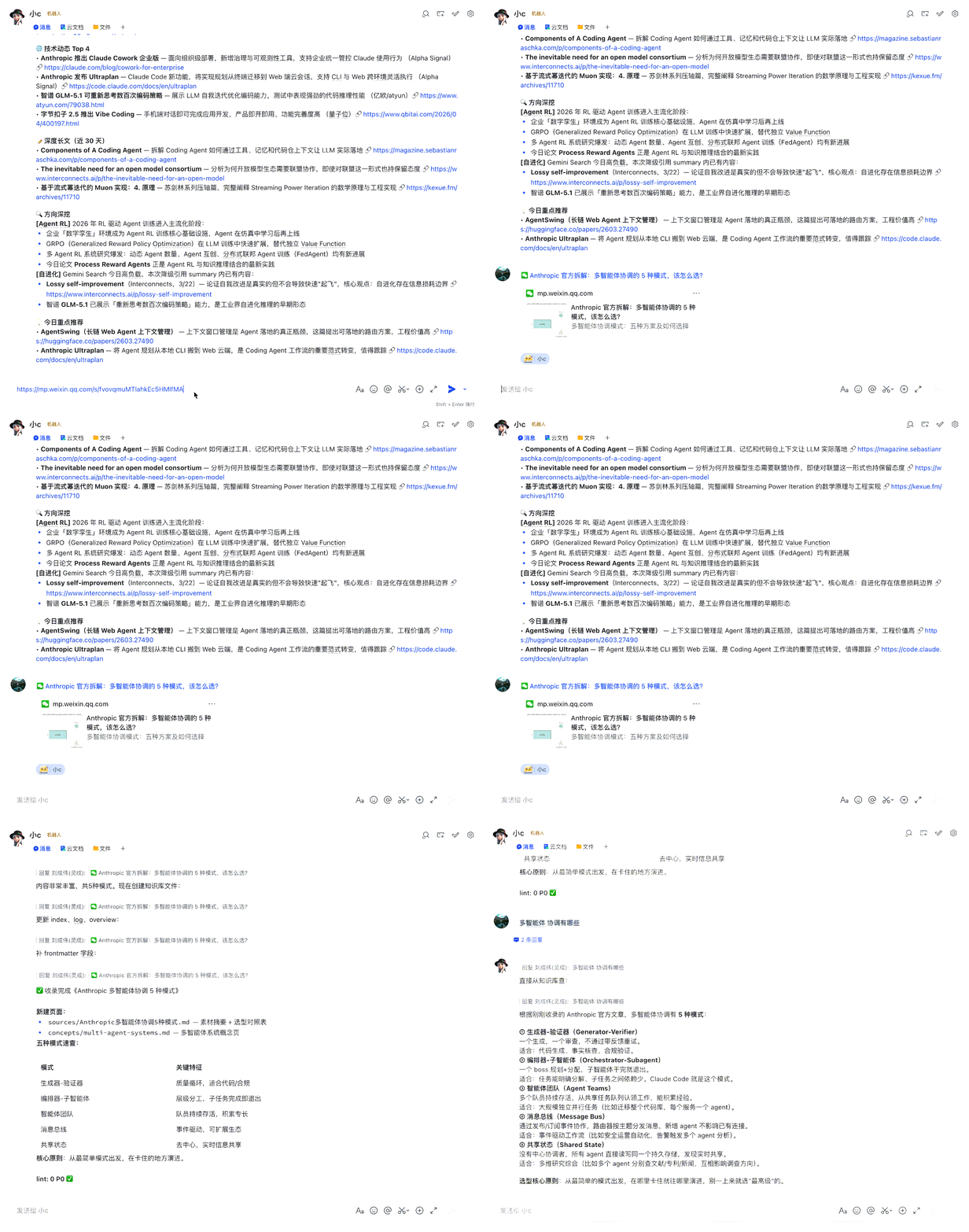
OpenClaw (Web)

Second Brain Skill can also be integrated with OpenClaw for conversational knowledge management.

Give OpenClaw access to the Skill and knowledge base, then configure the knowledge base path and auto-ingest rules in its Memory to ingest materials conversationally without typing a command each time.

For example, when you send a WeChat article link, the LLM can attempt to download it, save it to raw/, and ingest it if the OpenClaw environment provides the required browser or download tools (such as Playwright). This requires additional setup; configuring the knowledge base path alone is not sufficient.

OpenClaw auto-ingest demo

See User Guide — OpenClaw Integration for details.

Knowledge Base Directory Structure

~/my-kb/                        # Knowledge base instance
├── raw/                        # Raw materials (you write, LLM reads only)
│   ├── assets/                 # Images and attachments
│   └── *.md / *.pdf            # Material files
└── wiki/                       # LLM-generated and maintained knowledge base
    ├── index.md                # Content index
    ├── log.md                  # Operation log
    ├── overview.md             # Overview page
    ├── conventions.md          # Usage conventions and preferences
    ├── sources/                # Material summary pages
    ├── entities/               # Entity pages (people, organizations, tools)
    ├── concepts/               # Concept pages (theories, methods, patterns)
    └── analyses/               # Analysis pages (comparisons, syntheses)

Use Cases

  • Research — Continuously ingest papers and progressively build an interconnected domain knowledge base.
  • Reading — Process books chapter by chapter, automatically connecting characters, themes, and concepts.
  • Personal Growth — Organize journals, articles, and podcast notes into a structured landscape of personal knowledge.
  • Competitive Analysis — Track competitors and maintain evolving comparisons and analyses.
  • Team Knowledge Base — Ingest meeting notes and project documents while allowing the LLM to maintain structured knowledge.

Fork & Build Your Own

Second Brain Skill is designed as a starting point, not a finished product.

The goal is to make Karpathy's LLM Wiki concept easier to explore, experiment with, and extend.

You can fork this repository and adapt its knowledge structure, workflows, and conventions to your own needs.

Whether you're building a personal research assistant, a domain-specific knowledge base, or a team knowledge system, this project provides a practical foundation to get started.

Fork it. Customize it. Build your own second brain.

Contributions, feedback, and new ideas are welcome!

Documentation

  • User Guide — Installation, features, Obsidian integration, and OpenClaw setup.
  • Design Philosophy — Background and design principles inspired by Karpathy's LLM Wiki (in Chinese).
  • Skill Technical Docs — Page specifications, workflows, and directory structure.

Acknowledgments

  • Andrej Karpathy — For introducing the LLM Wiki concept that inspired this project.
  • Vannevar Bush — For proposing the Memex concept in 1945, an early vision of associative personal knowledge management.

Star History

Star History Chart

License

This project is licensed under the MIT License.

@francisdu53

francisdu53 commented Oct 28, 2026 •

Copy link
Copy Markdown

Karpathy's LLM Wiki, without vector search — 5 weeks in daily production

The usual answer, once the wiki grows, is to add embeddings on top. I went the other way and removed them entirely. This is what happened, with numbers.

EXIA SEED keeps your three layers exactly as described — immutable raw logs, LLM-compiled markdown pages, an index — and replaces vector search with a Fuzzy Cognitive Map (Kosko, 1986) laid over the pages.

How it works

conversation ──► raw/            append-only, hash-chained, secrets masked
                   │  nightly consolidation by an LLM: one fact = one cited sentence
                   ▼
              pages/<subject>.md ──► INDEX.md          (your wiki layer, untouched)
                   │  co-occurrence + naming + shared concepts
                   ▼
              graph/             sparse, weighted, every edge keeps its evidence
                   │
         memory_search (tool)  +  automatic recall on each message
  • Links are lived, not computed. Two subjects get linked when they appear together in conversation, are named together, or share a concept. Every edge stores the facts that created it.
  • Retrieval is spreading activation. Full text opens the door; the question lights up the pages it names, activation spreads through the FCM, and a small confidence-weighted scoring primitive ranks the facts. The facts that create a link come back as leads.
  • Checked against the source. Every fact cites its exact source line. A deterministic checker rejects any number, date or proper noun absent from the cited lines — and anything that rests only on the agent's own words (the agent must not persuade itself). It is a lexical check: a false statement built from the source's own words can still pass — a known blind spot, documented in the repo (doc 04 §5.3).
  • Fully auditable. Same memory + same question → same result, byte for byte (tested across hash seeds). Every score can be recomputed by hand.
  • Automatic recall. On each message, the subjects it touches surface on their own — as data, never as instructions.

Against embeddings, on the same memory

LongMemEval (ICLR 2025), oracle variant, the 500 histories fused into one single memory, official reading and judging prompts verbatim. Same consolidated memory for every engine — only retrieval changes.

fused memory, 500 questions EXIA SEED bge-m3 embeddings full text (BM25)
blind run, no tuning 34.2 % 35.4 % 31.6 %
+ exhaustive consolidation (confirmed on 300 held-out questions) 44.4 % 46.6 % 40.2 %
+ gpt-4.1-mini as reader 52.4 % 51.6 % —
correct abstention (unanswerable questions) 83 % 67 % —
footprint, same fused memory (3,901 facts) EXIA SEED bge-m3 embeddings
search latency, median / p95 11 ms / 18 ms 315 ms / 496 ms
RAM 123 MB, whole process 2.6 GB for the model alone
embedding model to load none bge-m3

The accuracy differences are not statistically significant — and that is the point: same quality, no embedding model, ~30× faster median search. EXIA SEED also loses less when the memory grows (−10 vs −15 points from per-question to fused memory) and says "I don't know" more often when it should.

On LoCoMo (ACL 2024), 10 conversations fused, Mem0 judging protocol: 36.8 % vs 38.3 % for embeddings; on the two clean held-out conversations, 121 vs 122 correct answers.

Every protocol was written before the measurement, hypotheses and thresholds included, and failures are published: with the gpt-4o-mini reader we miss our own pre-registered threshold by 0.2 point, and it's in the README.

In real life

EXIA SEED is the memory of Nexa, my personal assistant, running on Hermès Agent since 22 September 2026:

  • 583 cited facts in 64 subject pages after five weeks;
  • automatic recall live since 18 October: 37 of 100 messages received memories (~230 tokens each, silence otherwise);
  • asked "do you remember last week's shopping list?", the subject surfaced on its own and she restored all 23 items — nine days later, without being told where to look;
  • re-consolidating her whole history with a more exhaustive rule (on copies, with her production model): 422 → 732 facts, and 22 → 36 correct answers out of 80 questions drawn from my real messages (McNemar p = 0.001).

Benchmarks are defect magnifiers. The value of a memory shows over months of a real relationship — that's what the repo measures first.

Honest limits

  • Consolidation needs a capable model: on messy real conversations, a small model writes too few facts. Retrieval needs no model at all.
  • Validated on conversational memory, in French and English — not yet on sensor, mission or maintenance logs.
  • The sparse engine is O(nodes + edges) but hasn't been measured beyond a few thousand subjects.
  • The engineering log is in French.

What's in the repo

Apache 2.0. The MemoryProvider plugin for Hermès, French and English language masks, 21 test suites run in disposable containers with Hermès' real plugin loader, the benchmark scripts, and the full engineering log — every decision, every measurement, every mistake and its fix.

👉 https://github.com/francisdu53/exia-seed

Built on the shoulders of this gist, of Bart Kosko's fuzzy cognitive maps, and of Vannevar Bush's As We May Think. Engineering done in partnership with Claude (Anthropic).

I'm a craftsman, not a lab. If you run it on your own wiki, I'd love to know where it breaks.

@lucaslimafons

lucaslimafons commented Oct 29, 2026 •

Copy link
Copy Markdown

A wiki that writes and maintains itself from your GitHub repos.

It applies Andrej Karpathy's LLM Wiki idea to code. An agent reads your repositories and writes a wiki in which every claim cites the exact lines it came from. When a PR merges, the agent updates only the pages that change affected. You can chat with the wiki, and the chat can edit it too.

DeepWiki-style tools regenerate their docs. This one maintains them, and hands every change to you as a reviewable diff.

here: https://github.com/lucaslimafons/llm-repo-wiki

Some evals are here: https://github.com/lucaslimafons/llm-repo-wiki/blob/main/docs/evals.md

@hyunsoo36

Copy link
Copy Markdown

Thanks for sharing this idea. After trying the LLM Wiki pattern for knowledge retrieval, I’ve found that the ingest cost has been difficult to justify.

In my experience, the compiled wiki often lacks the details needed to answer a question, so the agent still has to retrieve and read the raw sources. The wiki then becomes an additional layer to navigate and verify, adding LLM calls, tool calls, latency, and tokens on top of the upfront compilation cost. So far, I haven’t seen enough retrieval savings to offset that overhead. This is an observation from my usage, rather than a controlled benchmark.

My suspicion is that this is partly a mismatch between ingest-time synthesis and open-ended future questions. Before knowing what users will ask, the compiler has to decide which details to preserve and how to organize them. A useful summary for one question may omit exactly what another question needs. Keeping the sources available preserves access to those details, but repeatedly falling back to them weakens the economic case for the intermediate wiki.

I can see the value of a wiki for human-readable synthesis, recording decisions, or recurring questions within a well-defined domain. What I’m less convinced by is its value as a general-purpose retrieval layer over an existing corpus.

Has anyone measured the conditions under which this pays off—especially with diverse, previously unseen questions, counting ingest, maintenance, wiki navigation, and source verification, against direct retrieval over the same raw sources? I’d be interested in both positive results and cases where removing the wiki layer worked better.

@donaldalice6-pixel

Copy link
Copy Markdown

My husband was diagnosed with ALS (Lou Gehrig's Disease) when he was 72 years old 4 years ago. The Rilutek (riluzole) did very little to help him. The medical team did even less. He decline was rapid and devastating. His arms weakened first, then his hands and legs. Last year, a family friend told us about Rakesh Herbs Centre and their successful ALS TREATMENT, we visited their website:https://rakeshherbal.com/ and ordered their ALS Formula, i am happy to report the treatment effectively treated and reversed he Amyotrophic Lateral Sclerosis (ALS), most of the symptoms stopped, he is able to walk and eat well, sleep well and exercise regularly., he is pretty active now and his attitude is extremely positive.

@liushengyu

Copy link
Copy Markdown

Thank you for writing this up. "The wiki is a persistent, compounding artifact" changed how I think about my own notes, and the point that bookkeeping is exactly the part a model never gets tired of is what made me try it.

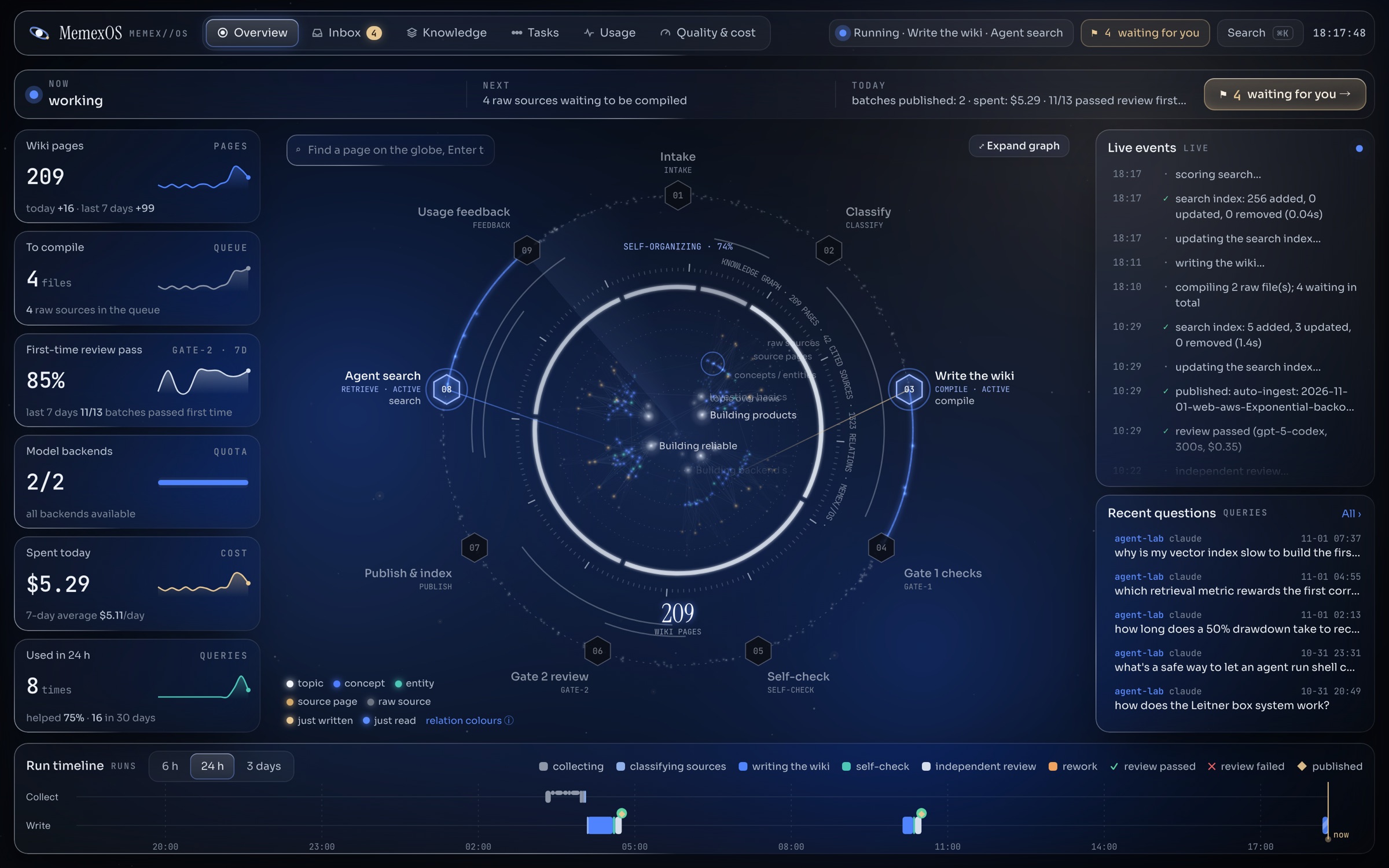
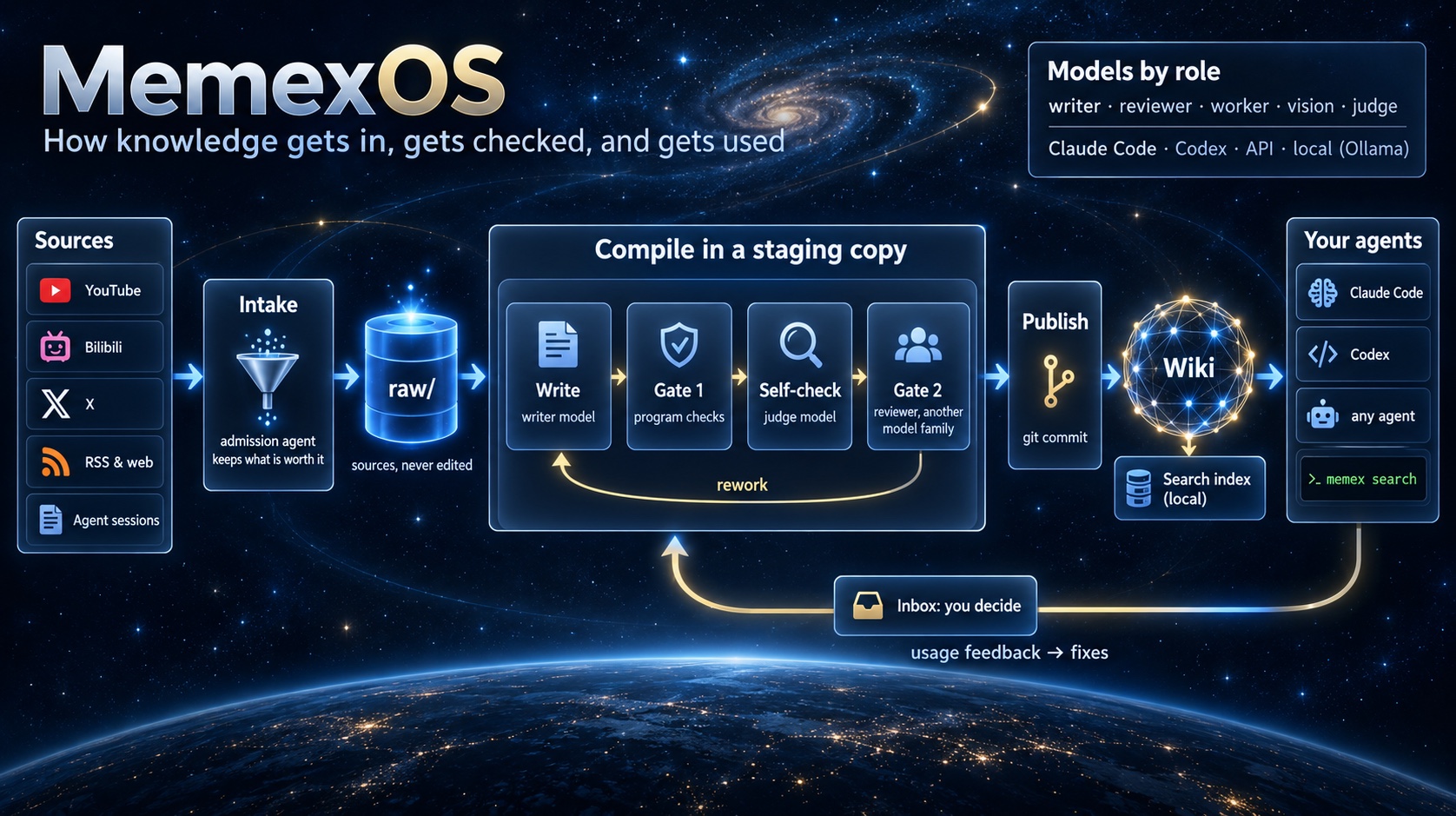
I've been building on the pattern as a personal side project and just open-sourced it: MemexOS. The question I kept asking was what it would take for the wiki to keep itself up to date for months, for one person and every agent they use, without drifting away from its sources. What I tried on top of your three layers:

  • Nothing reaches the wiki unreviewed. The writer works in a separate working copy of the repository on its own branch (a git worktree), so drafts never touch the wiki directly. Program checks run first, then a model from a different family reviews every new sentence against its source; problems go back to the writer.
  • Sources arrive without manual curation. Nightly collectors pick up what I already save (YouTube likes and watch later, Bilibili favorites, X bookmarks, RSS, links) and the conclusions from my Claude Code and Codex sessions; a model then reads each collected item and decides whether it is worth keeping.
  • Feedback from real use. It looks at how agents actually used the wiki (what they searched for, opened and cited, and whether it helped) and turns misses into corrections. Retrieval is also checked against a set of prepared questions, each marked with the page that should answer it, to see whether search finds that page.
  • Any agent can read it through a small CLI (memex search, memex get), and a local console shows what the pipeline is doing.

The console (shown with generated demo data):

MemexOS console

How it fits together:

MemexOS overview

To be honest, I'm not sure yet that this is a good implementation. It's a personal attempt and still a work in progress, and quite a few problems remain unsolved. The biggest one for me is how to keep accumulating knowledge continuously and, at the same time, keep it from being polluted and retire it correctly once it becomes outdated or wrong. I'm still exploring and iterating on that.

I'd be grateful for any advice, criticism or pointers to better approaches, here or in the repo's issues. Thanks again for sharing the idea so openly.

@ChavesLiu

Copy link
Copy Markdown

🧠 Second Brain Skill

Build Your Own AI-Powered Second Brain

Inspired by Karpathy's LLM Wiki.
A lightweight, extensible foundation for building a continuously evolving knowledge base.

GitHub Stars GitHub Forks MIT License Claude Code Skill

中文 | English | 日本語 | Español | Français | 한국어 | Documentation | Quick Start


Overview

Second Brain Skill is an open-source implementation inspired by Andrej Karpathy's LLM Wiki concept.

It transforms scattered personal knowledge into a structured, interconnected, and continuously evolving wiki — enabling AI assistants to better understand and work with your accumulated context.

The project provides a minimal, functional, and extensible foundation that developers can easily fork, customize, and build upon to create their own second brain.

From Retrieval to Knowledge Accumulation

Traditional RAG behaves like an interpreter; Second Brain Skill takes a compiler-inspired approach.

While traditional RAG primarily retrieves relevant information at query time, Second Brain Skill uses LLMs to progressively transform raw materials into a structured wiki, maintaining relationships between sources, entities, and concepts.

Instead of repeatedly interpreting isolated documents, knowledge is organized, connected, and refined over time.

RAG retrieves knowledge. LLM Wiki builds knowledge.

You curate materials and ask good questions. The LLM handles the heavy lifting — summarization, cross-referencing, archiving, and consistency maintenance.

Demo

See how raw materials become a structured, interconnected knowledge base.

Demo: help → init → ingest → query full workflow

Three-Layer Architecture

Second Brain Skill separates raw materials, structured knowledge, and operating conventions into three layers.

Layer Location Writer Reader Contents
Raw Materials raw/ You LLM Papers, articles, notes, PDFs, images
Knowledge Base wiki/ LLM You Summaries, entities, concepts, analyses, cross-references
Spec Skill Co-evolve LLM SCHEMA, workflows, scripts

This separation keeps original materials intact while allowing the knowledge base and its operating conventions to evolve independently.

Quick Start

1. Install

# Clone the repository
git clone https://github.com/ChavesLiu/second-brain-skill.git

# Copy the Skill to Claude Code's global directory
cp -r second-brain-skill/skills/wiki ~/.claude/skills/wiki

# Install dependencies
pip install -r ~/.claude/skills/wiki/scripts/requirements.txt

2. Initialize a Knowledge Base

/wiki init

Follow the prompts to choose a path, name, and content language for your knowledge base. The initialization workflow currently defines zh (Chinese) and en (English) for generated wiki content; translated READMEs do not add support for other content languages.

3. Ingest Your First Material

# Place materials in the raw/ directory
cp my-article.md ~/my-kb/raw/

Then run:

/wiki ingest

The LLM automatically reads the material, generates summary pages, extracts entities and concepts, and maintains cross-references.

A single ingestion may create or update 10–15 interconnected wiki pages, depending on the material.

4. Query Your Knowledge

/wiki query What is Memex?

Or simply ask in natural language:

Compare the pros and cons of RAG vs Wiki approaches

The LLM uses your accumulated knowledge base to answer questions and connect relevant information.

Core Commands

Command Function
/wiki help Show available commands and usage instructions
/wiki init Create and register a new knowledge base
/wiki ingest Ingest new materials (Markdown, PDF, images)
/wiki query <question> Answer questions based on the knowledge base
/wiki lint Check knowledge base health and consistency
/wiki wipe Delete or reset wiki content pages (moved to wiki/.trash/; raw/ is unchanged)
/wiki test Run automated tests

Use /wiki wipe restore to recover deleted or reset content pages. /wiki wipe empty-trash permanently empties the recycle bin; afterward, only content already saved in Git history can be recovered through Git.

All commands also support natural language triggers.

For example, you can say "ingest this article", "check the knowledge base", or "summarize information about XX" without remembering specific commands.

Natural Language Mode

You don't need to memorize commands. The Skill automatically recognizes your intent and executes the corresponding workflow.

What you say Action taken
"Ingest this article" Ingest the material
"What is Memex?" Query the knowledge base
"Compare RAG and Wiki approaches" Retrieve and synthesize relevant knowledge
"Always cite sources in answers" Record the preference in conventions.md
"Check the knowledge base" Run a knowledge base health check

This approach also works well with conversational interfaces such as OpenClaw, allowing you to interact with your knowledge base naturally.

Obsidian Integration

Second Brain Skill generates a Markdown-based knowledge base that can be opened directly in Obsidian.

You can explore:

  • Knowledge graphs — Visualize relationships between entities and concepts.
  • Backlinks — Navigate interconnected knowledge pages.
  • Structured notes — Browse summaries, analyses, and source references.

Obsidian knowledge graph view

Recommended plugins:

  • Front Matter Title — Display Chinese titles on graph nodes (pre-configured).
  • Dataview — Query metadata using frontmatter.
  • Web Clipper — Clip web articles directly into raw/.

OpenClaw (Web)

Second Brain Skill can also be integrated with OpenClaw for conversational knowledge management.

Give OpenClaw access to the Skill and knowledge base, then configure the knowledge base path and auto-ingest rules in its Memory to ingest materials conversationally without typing a command each time.

For example, when you send a WeChat article link, the LLM can attempt to download it, save it to raw/, and ingest it if the OpenClaw environment provides the required browser or download tools (such as Playwright). This requires additional setup; configuring the knowledge base path alone is not sufficient.

OpenClaw auto-ingest demo

See User Guide — OpenClaw Integration for details.

Knowledge Base Directory Structure

~/my-kb/                        # Knowledge base instance
├── raw/                        # Raw materials (you write, LLM reads only)
│   ├── assets/                 # Images and attachments
│   └── *.md / *.pdf            # Material files
└── wiki/                       # LLM-generated and maintained knowledge base
    ├── index.md                # Content index
    ├── log.md                  # Operation log
    ├── overview.md             # Overview page
    ├── conventions.md          # Usage conventions and preferences
    ├── sources/                # Material summary pages
    ├── entities/               # Entity pages (people, organizations, tools)
    ├── concepts/               # Concept pages (theories, methods, patterns)
    └── analyses/               # Analysis pages (comparisons, syntheses)

Use Cases

  • Research — Continuously ingest papers and progressively build an interconnected domain knowledge base.
  • Reading — Process books chapter by chapter, automatically connecting characters, themes, and concepts.
  • Personal Growth — Organize journals, articles, and podcast notes into a structured landscape of personal knowledge.
  • Competitive Analysis — Track competitors and maintain evolving comparisons and analyses.
  • Team Knowledge Base — Ingest meeting notes and project documents while allowing the LLM to maintain structured knowledge.

Fork & Build Your Own

Second Brain Skill is designed as a starting point, not a finished product.

The goal is to make Karpathy's LLM Wiki concept easier to explore, experiment with, and extend.

You can fork this repository and adapt its knowledge structure, workflows, and conventions to your own needs.

Whether you're building a personal research assistant, a domain-specific knowledge base, or a team knowledge system, this project provides a practical foundation to get started.

Fork it. Customize it. Build your own second brain.

Contributions, feedback, and new ideas are welcome!

Documentation

  • User Guide — Installation, features, Obsidian integration, and OpenClaw setup.
  • Design Philosophy — Background and design principles inspired by Karpathy's LLM Wiki (in Chinese).
  • Skill Technical Docs — Page specifications, workflows, and directory structure.

Acknowledgments

  • Andrej Karpathy — For introducing the LLM Wiki concept that inspired this project.
  • Vannevar Bush — For proposing the Memex concept in 1945, an early vision of associative personal knowledge management.

Star History

Star History Chart

License

This project is licensed under the MIT License.

Sign up for free to join this conversation on GitHub. Already have an account? Sign in to comment