
-
-
Save cooldil/0b2c5ee22befbbfcdefd06c9cf2b7a98 to your computer and use it in GitHub Desktop.
| import requests, pickle | |
| from datetime import datetime | |
| import json, pytz | |
| import pandas as pd | |
| from influxdb import DataFrameClient | |
| # Set "static" variables | |
| login_url = "https://monitoring.solaredge.com/solaredge-apigw/api/login" | |
| panels_url = "https://monitoring.solaredge.com/solaredge-web/p/playbackData" | |
| DAILY_DATA = "4" | |
| WEEKLY_DATA = "5" | |
| # Set "customizable" variables. Update as appropriate | |
| COOKIEFILE = 'solaredge.cookies' | |
| TIMEPERIOD = DAILY_DATA | |
| SOLAREDGE_USER = "" # web username | |
| SOLAREDGE_PASS = "" # web password | |
| SOLAREDGE_SITE_ID = "" # site id | |
| INFLUXDB_IP = "" | |
| INFLUXDB_PORT = 8086 | |
| INFLUXDB_DATABASE = "" | |
| INFLUXDB_SERIES = "optimizers" | |
| INFLUXDB_RETENTION_POLICY = "autogen" | |
| session = requests.session() | |
| try: # Make sure the cookie file exists | |
| with open(COOKIEFILE, 'rb') as f: | |
| f.close() | |
| except IOError: # Create the cookie file | |
| session.post(login_url, headers = {"Content-Type": "application/x-www-form-urlencoded"}, data={"j_username": SOLAREDGE_USER, "j_password": SOLAREDGE_PASS}) | |
| panels = session.post(panels_url, headers = {"Content-Type": "application/x-www-form-urlencoded", "X-CSRF-TOKEN": session.cookies["CSRF-TOKEN"]}, data={"fieldId": SOLAREDGE_SITE_ID, "timeUnit": TIMEPERIOD}) | |
| try: | |
| with open(COOKIEFILE, 'wb') as f: | |
| pickle.dump(session.cookies, f) | |
| f.close() | |
| except IOError: | |
| print('Unable to create cookie file (readonly filesystem?): ' + COOKIEFILE) | |
| try: | |
| with open(COOKIEFILE, 'rb') as f: | |
| session.cookies.update(pickle.load(f)) | |
| except IOError: | |
| print('Unable to open cookie file: ' + COOKIEFILE) | |
| print('Will continue running with new login...') | |
| session.post(login_url, headers = {"Content-Type": "application/x-www-form-urlencoded"}, data={"j_username": SOLAREDGE_USER, "j_password": SOLAREDGE_PASS}) | |
| # Get the cookie expiration | |
| for cookie in session.cookies: | |
| if cookie.name == 'SolarEdge_SSO-1.4': | |
| cookie_expiration = cookie.expires | |
| panels = session.post(panels_url, headers = {"Content-Type": "application/x-www-form-urlencoded", "X-CSRF-TOKEN": session.cookies["CSRF-TOKEN"]}, data={"fieldId": SOLAREDGE_SITE_ID, "timeUnit": TIMEPERIOD}) | |
| if (panels.status_code != 200) or (datetime.now() > datetime.fromtimestamp(cookie_expiration)): # Update cookie if expired | |
| session.post(login_url, headers = {"Content-Type": "application/x-www-form-urlencoded"}, data={"j_username": SOLAREDGE_USER, "j_password": SOLAREDGE_PASS}) | |
| panels = session.post(panels_url, headers = {"Content-Type": "application/x-www-form-urlencoded", "X-CSRF-TOKEN": session.cookies["CSRF-TOKEN"]}, data={"fieldId": SOLAREDGE_SITE_ID, "timeUnit": TIMEPERIOD}) | |
| if (panels.status_code != 200): | |
| exit() # Terminate if unable to get panel data | |
| f.close() | |
| try: | |
| with open(COOKIEFILE, 'wb') as f: | |
| pickle.dump(session.cookies, f) | |
| f.close() | |
| except IOError: | |
| print('Unable to update expired cookie file [' + str(datetime.fromtimestamp(cookie_expiration)) + '] (readonly filesystem?): ' + COOKIEFILE) | |
| response = panels.content.decode("utf-8").replace('\'', '"').replace('Array', '').replace('key', '"key"').replace('value', '"value"') | |
| response = response.replace('timeUnit', '"timeUnit"').replace('fieldData', '"fieldData"').replace('reportersData', '"reportersData"') | |
| response = json.loads(response) | |
| data = {} | |
| for date_str in response["reportersData"].keys(): | |
| date = datetime.strptime(date_str, '%a %b %d %H:%M:%S GMT %Y') | |
| date = pytz.timezone('America/New_York').localize(date).astimezone(pytz.utc) | |
| for sid in response["reportersData"][date_str].keys(): | |
| for entry in response["reportersData"][date_str][sid]: | |
| if entry["key"] not in data.keys(): | |
| data[entry["key"]] = {} | |
| data[entry["key"]][date] = float(entry["value"].replace(",", "")) | |
| df = pd.DataFrame(data) | |
| conn = DataFrameClient(INFLUXDB_IP, INFLUXDB_PORT, "", "", INFLUXDB_DATABASE) | |
| conn.write_points(df, INFLUXDB_SERIES, retention_policy=INFLUXDB_RETENTION_POLICY) |

still usable because of "I am not a robot" checkbox at login at https://monitoring.solaredge.com/ ?
I am having trouble with python:
marc@gigabyte:~/dev/powerEdge$ python3 ./monitor.py
  File "./monitor.py", line 29
    return
    ^
SyntaxError: 'return' outside function
marc@gigabyte:~/dev/powerEdge$ python2 ./monitor.py
  File "./monitor.py", line 29
    return
SyntaxError: 'return' outside function

I am having trouble with python:
Made some changes to the code in order to make it handle new setups a bit more gracefully :-)
thanks for this update.
still unable to connect sur Web user interface at monitor.solaredge.com:
marc@gigabyte:~/dev/powerEdge$ python3 monitor2.py
Traceback (most recent call last):
  File "monitor2.py", line 26, in <module>
    with open('solaredge.cookies', 'rb') as f:
FileNotFoundError: [Errno 2] No such file or directory: 'solaredge.cookies'

During handling of the above exception, another exception occurred:

Traceback (most recent call last):
  File "/usr/lib/python3/dist-packages/urllib3/connection.py", line 159, in _new_conn
    conn = connection.create_connection(
  File "/usr/lib/python3/dist-packages/urllib3/util/connection.py", line 61, in create_connection
    for res in socket.getaddrinfo(host, port, family, socket.SOCK_STREAM):
  File "/usr/lib/python3.8/socket.py", line 918, in getaddrinfo
    for res in _socket.getaddrinfo(host, port, family, type, proto, flags):
socket.gaierror: [Errno -2] Name or service not known

During handling of the above exception, another exception occurred:

Traceback (most recent call last):
  File "/usr/lib/python3/dist-packages/urllib3/connectionpool.py", line 662, in urlopen
    self._prepare_proxy(conn)
  File "/usr/lib/python3/dist-packages/urllib3/connectionpool.py", line 950, in _prepare_proxy
    conn.connect()
  File "/usr/lib/python3/dist-packages/urllib3/connection.py", line 314, in connect
    conn = self._new_conn()
  File "/usr/lib/python3/dist-packages/urllib3/connection.py", line 171, in _new_conn
    raise NewConnectionError(
urllib3.exceptions.NewConnectionError: <urllib3.connection.VerifiedHTTPSConnection object at 0x7fec33dcaa00>: Failed to establish a new connection: [Errno -2] Name or service not known

During handling of the above exception, another exception occurred:

Traceback (most recent call last):
  File "/usr/lib/python3/dist-packages/requests/adapters.py", line 439, in send
    resp = conn.urlopen(
  File "/usr/lib/python3/dist-packages/urllib3/connectionpool.py", line 719, in urlopen
    retries = retries.increment(
  File "/usr/lib/python3/dist-packages/urllib3/util/retry.py", line 436, in increment
    raise MaxRetryError(_pool, url, error or ResponseError(cause))
urllib3.exceptions.MaxRetryError: HTTPSConnectionPool(host='monitoring.solaredge.com', port=443): Max retries exceeded with url: /solaredge-apigw/api/login (Caused by ProxyError('Cannot connect to proxy.', NewConnectionError('<urllib3.connection.VerifiedHTTPSConnection object at 0x7fec33dcaa00>: Failed to establish a new connection: [Errno -2] Name or service not known')))

During handling of the above exception, another exception occurred:

Traceback (most recent call last):
  File "monitor2.py", line 29, in <module>
    session.post(login_url, headers = {"Content-Type": "application/x-www-form-urlencoded"}, data={"j_username": SOLAREDGE_USER, "j_password": SOLAREDGE_PASS})
  File "/usr/lib/python3/dist-packages/requests/sessions.py", line 581, in post
    return self.request('POST', url, data=data, json=json, **kwargs)
  File "/usr/lib/python3/dist-packages/requests/sessions.py", line 533, in request
    resp = self.send(prep, **send_kwargs)
  File "/usr/lib/python3/dist-packages/requests/sessions.py", line 646, in send
    r = adapter.send(request, **kwargs)
  File "/usr/lib/python3/dist-packages/requests/adapters.py", line 510, in send
    raise ProxyError(e, request=request)
requests.exceptions.ProxyError: HTTPSConnectionPool(host='monitoring.solaredge.com', port=443): Max retries exceeded with url: /solaredge-apigw/api/login (Caused by ProxyError('Cannot connect to proxy.', NewConnectionError('<urllib3.connection.VerifiedHTTPSConnection object at 0x7fec33dcaa00>: Failed to establish a new connection: [Errno -2] Name or service not known')))

good work, thanks
Have two questions tough:
- even if I have 30 optimizers, only 21 optimizers are read out and written into database.
- as result of the script I get panel IDs in the database. Any idea how to correlate with the serial of the optimizer?
To get it to write into an influxDB 2.0 I had to change the writing process:
client=InfluxDBClient(url=INFLUXDB_IP, token = INFLUXDB_TOKEN, org=INFLUXDB_ORG)
write_api = client.write_api(write_options=SYNCHRONOUS)
write_api.write(bucket=INFLUXDB_BUCKET, org=INFLUXDB_ORG, record=df, data_frame_measurement_name = "optimizer")
thank you
wolferl
- as result of the script I get panel IDs in the database. Any idea how to correlate with the serial of the optimizer?
It's a bit of a manual and cumbersome process :-) At least the only way I could figure out how to do so was by using the Dev Tools -> Network capture from within a browser and looking at the "request URL" when querying for the "info" of each individual component (inverter/module).
- Navigate to https://monitoring.solaredge.com and logon
- Navigate to the (logical) layout of your system
- Press F12 (to bring up the Dev tools on most browsers) and switch over to the Network tab
- Right click on the "component" that you want to determine the "ID" of and select Info
- Within the captured data in the Dev Tools pane, look for the entry where the Request URL begins with "https://monitoring.solaredge.com/solaredge-web/p/systemData?reporterId=#########". The ######### value is the ID of the component as seen by the script. The Info page that opened up on the monitoring site should have the Serial # list. You can use the two pieces of data to map one to the other....
I did the above for all 35 of my panels, the inverter itself and the three string objects and then I inserted the code (one line for each component) below between lines 42 and 43.
current line 42 response = response.replace('timeUnit', '"timeUnit"').replace('fieldData', '"fieldData"').replace('reportersData', '"reportersData"')
new line 43 response = response.replace('########1', 'Component #1 Friendly name')
new line 44 response = response.replace('########2', 'Component #2 Friendly name')
... additional line for each addtional component ID to friendly name mapping
current line 43 response = json.loads(response)
- even if I have 30 optimizers, only 21 optimizers are read out and written into database.
Hmm... not sure what is going on there. Are you seeing all 30 optimizers/modules when viewing the physical/logical layout via the Solaredge site? I personally have 35 modules/optimizers on a single inverter spread out across three stings. The code returns (35+1+3=39) component values for me just fine...
Hi
thank you for the fast response!
- even if I have 30 optimizers, only 21 optimizers are read out and written into database.
I must correct myself: I have one inverter, one string (I have only one) and 30 optimizers. At the portal I see all panels and have already copied the ID and serials to match them in the future.
It seems kind of random. Today I sent the same query and got all data (inverter, string and all panels). 10min later I got only the inverter itself and 5min later I got only a couple of optimizers... very odd
Another question:
I compared the values from the script with the values in the portal and could not find any match. Now, I'm a bit confused. What do we get here? Energy or Power values? And do you have a clue, why the portal delivers different values to the script?
Thank you!
Another question: I compared the values from the script with the values in the portal and could not find any match. Now, I'm a bit confused. What do we get here? Energy or Power values? And do you have a clue, why the portal delivers different values to the script?
The script returns the Power values (technically averaged over a 15 minute period since that is a granularity that SE provides via the monitoring site). Since the values are only updated/published very 15 minutes or so, there is no value in running the script more often than every 15 minutes.
Run the script over a 24 hour period and see if the data stored in InfluxDB matches what is on the SE site....
Hi
thank you for the advice. Tested the script results (before Influx) against the Solar Edge Web Portal (CSV export). It's quite similar, but not exactly the same. I assume it's some different roundings... See below:
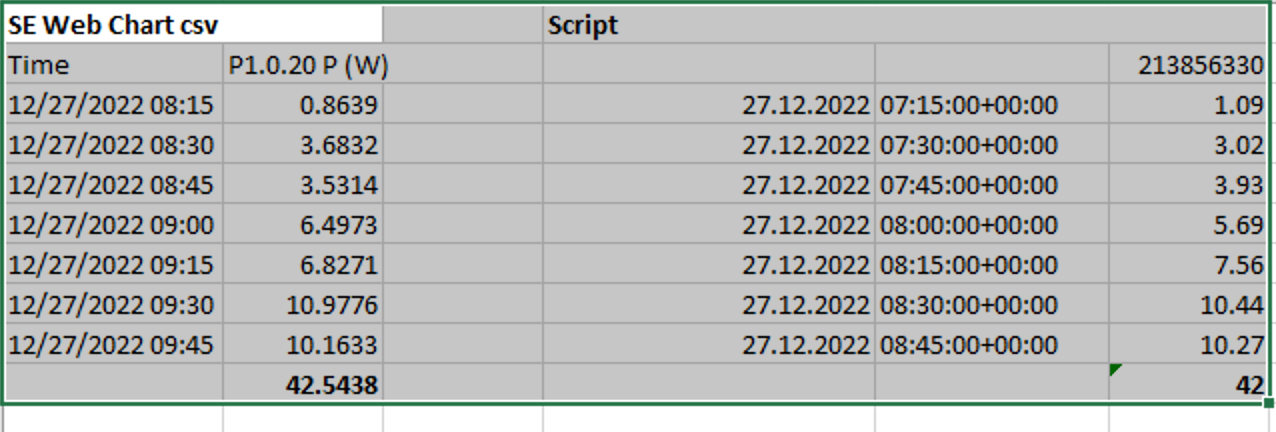
I'm really not familiar with python, could you give me a hint where at the script you choose the data to be extracted and could the other data (Energy, Current, Voltage Panel, Voltage Optimizer) as well be extracted?
Merry christmay

Hi @cooldil I'm wondering whether you happen to have a list of API parameters that I could use alongside those that you programmed in this GIST. Or, could you confirm that these are the only ones?

Hi
I am wondering how to find this url on dashboard. Thanks!
panels_url = "https://monitoring.solaredge.com/solaredge-web/p/playbackData"
Hi I am wondering how to find this url on dashboard. Thanks! panels_url = "https://monitoring.solaredge.com/solaredge-web/p/playbackData"
The URL you referenced is called when you change over to the Layout area and then click on "Show playback". This brings up a "slider view" where you can see what the output of each of your panels was for any given 15 minute interval.
Thanks for your reply. It works well for me!
Another question, it seems that we are only able to retrive data on current day. Cause the "Show playback" can't display historical daily data. Am I right? And do you have any idea to retrive historical panel data. Thanks.
the ouptput dataframe's column names are be like:
197469474 | 197469507 | 197469573 | 197469606
I am wondering how to match it with the module number on the dashboard. Thanks again!
Thanks for your reply. It works well for me! Another question, it seems that we are only able to retrive data on current day. Cause the "Show playback" can't display historical daily data. Am I right? And do you have any idea to retrive historical panel data. Thanks.
You can go back upto a week. Change the TIMEPERIOD variable to "WEEKLY_DATA"
the ouptput dataframe's column names are be like: 197469474 | 197469507 | 197469573 | 197469606
I am wondering how to match it with the module number on the dashboard. Thanks again!
See my earlier comment: https://gist.github.com/cooldil/0b2c5ee22befbbfcdefd06c9cf2b7a98?permalink_comment_id=4408019#gistcomment-4408019

Hello @cooldil, thanks for sharing your snippet and insights - very helpful and useful! I just added some code to automatically extract the logical IDs (in my case 1.1.1. – 1.1.29.) and serial numbers of optimizers from SE. Hope that might helpful for somebody else.
Here is the code:
# code snippet (2025-06-04 by Thomas Hermann) to retrieve logical IDs
# (e.g. 1.1.1 -- 1.1.29) and serial numbers for panel optimizers from SE,
# Instruction: add the following code after df = pd.DataFrame(data) in cooldils
# snippet (s. line 79). Disclaimer: I did not use/test this with influxdb !
#
# The code requests/extracts information from SE and persists it as dict into
# a pickle file. If that file already exists, it is simply loaded.
# As SE keys stay identical, getting the info needs to be done only once,
#
# Note that API calls work only directly after retrieving data, as otherwise the cookie
# would be outdated.
#
# Results:
# - SE_keys_to_ids is a dictionary where keys are the SE keys of the panels, and values
#    are tuples containing (logical_id, serial_nr).
try:
    with open("SE_keys_to_ids.pickle", 'rb') as fp:
        SE_keys_to_ids = pickle.load(fp)
except FileNotFoundError:
    SE_keys_to_ids = {}
    for module_key in df.columns:  # column names are SE keys
        print(f"get logical ID and serial nr for SE_key {module_key}")
        res = session.post(
            "https://monitoring.solaredge.com/solaredge-web/p/systemData",
            headers={
                "Content-Type": "application/x-www-form-urlencoded",
                "X-CSRF-TOKEN": session.cookies["CSRF-TOKEN"],
            },
            data=dict(
                fieldId=SOLAREDGE_SITE_ID,
                reporterId=module_key,
                activeTab="0",
                isPublic="false",
                type="panel",
            )
        )
        # res.text contains a javascript file which contains
        # as first statement ```SE.systemData = {...}```, a
        # dictionary definition which is evaluted in the next line
        # a bit quick and dirty...
        module_dict = eval(res.text.split("\n")[11][16:-1])
        logical_id = module_dict['description'].split()[1]
        serial_nr = module_dict['serialNumber']
        SE_keys_to_ids[module_key] = (logical_id, serial_nr)
        # all information extracted, lets safe pickle file
    with open("SE_keys_to_ids.pickle", 'wb') as fp:
        pickle.dump(SE_keys_to_ids, fp)
print("Loading, resp. extracting SE_keys_to_ids completed")

# set proper df column names (replacing SE_keys by panel name)
df.columns = [ SE_keys_to_ids[mkey][0] for mkey in df.columns]
Thomas you are a life saver! Thank you for the solution!
@cooldil It seems SolarEdge is upgrading their endpoint API (https://marketing.solaredge.com/legacy-api-sign-up-for-interest). Will there be an update on your script?
@cooldil It seems SolarEdge is upgrading their endpoint API (https://marketing.solaredge.com/legacy-api-sign-up-for-interest). Will there be an update on your script?
Unknown at this time. The current gist was technically piggybacking off of the calls that the (old) monitoring site made internally. SE is (obviously) switching over to a new api platform using OAuth with tiered access levels.
They do have some documentation that is helpful for this particular gist:
https://api-docs.solaredge.com/docs/developer-platform/df8kx5j4z9vi0-homeowner-and-self-access-guide
That being said, I have not yet reviewed the new API docs to determine if optimizer level data is even available or not. Given other priorities in life :-), updating the gist is most likely not going to be high on my list of things to do.
@cooldil It seems SolarEdge is upgrading their endpoint API (https://marketing.solaredge.com/legacy-api-sign-up-for-interest). Will there be an update on your script?
Unknown at this time. The current gist was technically piggybacking off of the calls that the (old) monitoring site made internally. SE is (obviously) switching over to a new api platform using OAuth with tiered access levels.
They do have some documentation that is helpful for this particular gist: https://api-docs.solaredge.com/docs/developer-platform/df8kx5j4z9vi0-homeowner-and-self-access-guide
That being said, I have not yet reviewed the new API docs to determine if optimizer level data is even available or not. Given other priorities in life :-), updating the gist is most likely not going to be high on my list of things to do.
It's alright. I just wanted to let you the big change with SolarEdge API and the script no longer works. I am working on a different approach with playwright to get the data.
So I've been digging around a little bit and below are my findings so far, @cooldil and @donald323. From my cron job of weekly downloading the panel level data it is clear that around August 30 they shut down the panels_url because since then it gives a 410 gone status code. However, their official dashboard still has the playback data ranging 3 months back in time.
Using the browser inspector, I have been able to dig up few interesting endpoint like URLs that might be used to get the panel level downloads working again. One of them is panels_url = "https://monitoring.solaredge.com/services/layout/playback/site/<SITE_ID>/optimizers-compact?resolution=hours&start-date=2025-09-29T00:00:00Z&end-date=2025-09-29T23:59:59Z". I even haphazardly tested resolution=quarter_hours as working!
The mechanism to get this endpoint to give something back is similar as in the original script: you need to have the cookies in place. That's also where I am currently being blocked: I haven't been able to find a URL that can replace the login_url. The original value still works (so no 410 there) but generates old cookies that are not ok/sufficient for the new panels_url. What I now did is simply copy-paste the cookies from the inspector into the script file and parsing them from a string like so and loading this with session.cookies.update(cookies_dict) (instead of loading the pickle).
    cookie_string = "paste cookie string from Network > Headers tab here"
    cookies_dict = {
        key.strip(): value.strip()
        for key, value in [item.split("=") for item in cookie_string.split(";")]
    }
The other thing that requires a bit of attention is that the TIMEPERIOD via WEEKLY_DATA or DAILY_DATA no longer works so some manual calculation and tracking work needs to be done. When thinking about cron jobs this either means caching the last time period somehow (on disk) or using time stamped files (I am not using databases to store the data) to determine the next period.
For both resolutions (so, quarter hours and hours), the accepted period between start and end date as URL parameters appears to be a week (8 days actually based on a single test).
Finally, the new data needs to be interpreted.
Will get back when I have something slightly more concrete to post.
So I've been digging around a little bit and below are my findings so far, @cooldil and @donald323. From my cron job of weekly downloading the panel level data it is clear that around August 30 they shut down the
panels_urlbecause since then it gives a 410 gone status code. However, their official dashboard still has the playback data ranging 3 months back in time.Using the browser inspector, I have been able to dig up few interesting endpoint like URLs that might be used to get the panel level downloads working again. One of them is
panels_url = "https://monitoring.solaredge.com/services/layout/playback/site/<SITE_ID>/optimizers-compact?resolution=hours&start-date=2025-09-29T00:00:00Z&end-date=2025-09-29T23:59:59Z". I even haphazardly testedresolution=quarter_hoursas working!The mechanism to get this endpoint to give something back is similar as in the original script: you need to have the cookies in place. That's also where I am currently being blocked: I haven't been able to find a URL that can replace the
login_url. The original value still works (so no 410 there) but generates old cookies that are not ok/sufficient for the newpanels_url. What I now did is simply copy-paste the cookies from the inspector into the script file and parsing them from a string like so and loading this withsession.cookies.update(cookies_dict)(instead of loading the pickle).cookie_string = "paste cookie string from Network > Headers tab here" cookies_dict = { key.strip(): value.strip() for key, value in [item.split("=") for item in cookie_string.split(";")] }The other thing that requires a bit of attention is that the
TIMEPERIODviaWEEKLY_DATAorDAILY_DATAno longer works so some manual calculation and tracking work needs to be done. When thinking about cron jobs this either means caching the last time period somehow (on disk) or using time stamped files (I am not using databases to store the data) to determine the next period.For both resolutions (so, quarter hours and hours), the accepted period between start and end date as URL parameters appears to be a week (8 days actually based on a single test).
Finally, the new data needs to be interpreted.
Will get back when I have something slightly more concrete to post.
Something like this?
async def fetch_day(page, site_id, day, serials, metric_uri=METRIC_URI):
    """POST ``generate-chart`` for one day of one optimizer measurement."""
    start, end = day_range(day)
    body = {
        "reportPeriod": {"from": start, "to": end},
        "datasources": [{
            "metrics": [{"metricType": "measurement",
                         "metricsCategoryName": "measurements",
                         "uri": metric_uri}],
            "datasourcePopulation": {"populationType": "deviceList",
                                     "siteId": site_id,
                                     "deviceType": "OPTIMIZER",
                                     "deviceSerials": list(serials)},
            "alignmentGranularity": GRANULARITY,
        }],
    }
    response = await page.request.post(f"{API}/custom/site/{site_id}/generate-chart", data=body)
    text = await response.text()
    if response.status >= 400:
        raise RuntimeError(f"generate-chart -> {response.status}: {text[:200]}")
    return json.loads(text)
I have an operational script that can extract the data, not by using the cookies, but to emulate myself logging to the platform via playwright. I might release it as soon as I have time to clear anything sensitive in the script.
Certainly interesting to have a look at your script when you are ready to share @donald323 , despite not being familiar with playwright.
From looking at its website, OTOH I am not yet fully sure that it will suit my usecase as I plan on continuing using a linux server and cronjob for repeated downloads. Having said that, I do recognize that with a quarter year period of data being available and having the ability to specify longer time spans to download, I could also make this a bimonthly task in my todo to do manually if playwright proves the only way to get the login automated.
WARNING: This is work in progress and was customized for my own use. Test/validate before using it for real in a "production" environment.
Put in the correct values for your Solaredge and Influx environments. Populate the Optimizer Name mapping array. If your friendly panel names do NOT start with "Panel", then make appropriate changes on lines 110 and 122. If you have strings that aren't 1.1, 1.2 and 1.3, you will have to make the appropriate changes on line 131.
You will also need to import a library (solaredge_web) to allow for the OAuth authentication tokens.
EDIT: Made modifications to pull 15 minute interval data instead of hourly. This matches what was being pulled prior to Aug 30 with the old "API". Tweaked the solaredge_web module as well to support the 15 min resolution and to record the first and last zero values in runs of 4 or more (previously all zero values were dropped) in order to prevent issues with Influx queries that referenced previous values when one did not exist for a referenced timestamp.
import asyncio
from datetime import datetime, timedelta
from zoneinfo import ZoneInfo

import aiohttp
import pandas as pd
from influxdb_client import InfluxDBClient
from influxdb_client.client.write_api import SYNCHRONOUS

from solaredge_web import SolarEdgeWeb   # https://github.com/cooldil/solaredge-web/blob/main/src/solaredge_web/solaredge.py


# SolarEdge
SOLAREDGE_USER = "<SOLAREDGE EDGE USERNAME (email)>"
SOLAREDGE_PASS = "<PASSWORD>"
SOLAREDGE_SITE_ID = "<SOLAREDGE SITE NUMBER (7 digits)>"

# The SolarEdge compact playback API interprets its date range as site-local
# time, despite the Z suffix used in its request URL.
SITE_TIMEZONE = ZoneInfo("America/New_York")
REQUEST_TIMEOUT = 30

# Map current optimizer serials to friendly field names.
# Use the optimizer serials, not the old numeric reporter-ID replacements from playbackData.
OPTIMIZER_NAME_MAPPING = {
    "<8 character serial #1>": "<friendly panel name 1>",
    "<8 character serial #2>": "<friendly panel name 2>",
    "<8 character serial #3>": "<friendly panel name 3>"
}


# InfluxDB v2
INFLUXDB_SERIES = "<INFLUX MEASUREMENT NAME>"
INFLUXDB_URL = "http://influxURL:8086"
INFLUXDB_BUCKET = "<INFLUX BUCKET>"
INFLUXDB_ORG = "<INFLUX ORG NAME>"
INFLUXDB_TOKEN = "<INFLUX TOKEN>"

def optimizer_name(device_id: str) -> str:
    """Resolve a layout serial to its friendly panel name."""
    short_serial = device_id.split("-")[0]
    return OPTIMIZER_NAME_MAPPING.get(
        device_id,
        OPTIMIZER_NAME_MAPPING.get(short_serial, short_serial),
    )


def get_date_range() -> tuple[datetime, datetime]:
    """Return the prior two local calendar days, as naive site-local times."""
    now_local = datetime.now(SITE_TIMEZONE)
    start_local = (now_local - timedelta(days=1)).replace(
        hour=0,
        minute=0,
        second=0,
        microsecond=0,
        tzinfo=None,
    )
    end_local = start_local + timedelta(days=2) - timedelta(seconds=1)
    return start_local, end_local


async def get_optimizer_dataframe() -> pd.DataFrame:
    start_local, end_local = get_date_range()
    async with aiohttp.ClientSession(
        timeout=aiohttp.ClientTimeout(total=REQUEST_TIMEOUT),
        headers={
            "User-Agent": "Mozilla/5.0",
            "Accept": "application/json, text/plain, */*",
        },
    ) as session:
        solaredge = SolarEdgeWeb(
            username=SOLAREDGE_USER,
            password=SOLAREDGE_PASS,
            site_id=str(SOLAREDGE_SITE_ID),
            session=session,
            timeout=REQUEST_TIMEOUT,
        )

        # This performs the direct OAuth2 PKCE login:
        #
        # login.solaredge.com/oauth2/authorize
        # login.solaredge.com/oauth2/token
        # monitoring.solaredge.com/services/auth/token?legacy=false
        #
        # It then reads:
        # /services/layout/logical/generic/v2/site/{site_id}
        # /services/layout/playback/site/{site_id}/optimizers-compact
        energy_slots = await solaredge.async_get_energy_data(
            start_date=start_local,
            end_date=end_local,
            resolution='quarter_hours'
        )

    rows = []

    for slot in energy_slots:
        # The library returns a naive timestamp in the site's local timezone.
        timestamp_utc = (
            pd.Timestamp(slot.start_time)
            .tz_localize(SITE_TIMEZONE)
            .tz_convert("UTC")
        )

        row = {"time": timestamp_utc}

        for device_id, power_w in slot.values.items():
            friendly_name = optimizer_name(device_id)

            # The library also returns aggregate layout devices. Keep only
            # optimizer/panel measurements here; calculate your own aggregates.
            if friendly_name.startswith("Panel "):
                row[friendly_name] = power_w

        rows.append(row)

    if not rows:
        raise RuntimeError("SolarEdge returned no optimizer data.")

    df = pd.DataFrame(rows).set_index("time").sort_index()

    panel_columns = [
        column for column in df.columns
        if column.startswith("Panel ")
    ]

    if not panel_columns:
        raise RuntimeError(
            "No optimizer serials matched OPTIMIZER_NAME_MAPPING. "
            "Update the serial-to-panel mapping."
        )

    for string_number in ("1.1", "1.2", "1.3"):
        string_columns = [
            column for column in panel_columns
            if column.startswith(f"Panel {string_number}.")
        ]
        df[f"String {string_number}"] = (
            df[string_columns].sum(axis=1)
            if string_columns
            else 0.0
        )

    df["Inverter"] = df[panel_columns].sum(axis=1)

    # The Influx client uses the DateTimeIndex as the timestamp.
    df.index.name = "time"
    return df


def write_to_influx(df: pd.DataFrame) -> None:
    with InfluxDBClient(
        url=INFLUXDB_URL,
        token=INFLUXDB_TOKEN,
        org=INFLUXDB_ORG,
    ) as client:
        write_api = client.write_api(write_options=SYNCHRONOUS)
        write_api.write(
            bucket=INFLUXDB_BUCKET,
            org=INFLUXDB_ORG,
            record=df,
            data_frame_measurement_name=INFLUXDB_SERIES,
        )


async def main() -> None:
    df = await get_optimizer_dataframe()
    write_to_influx(df)
    print(f"Done! Wrote {len(df)} optimizer time slots.")


if __name__ == "__main__":
    asyncio.run(main())
Cool stuff @cooldil. Happy that you've managed to get something working but I hope you didn't cut back on your other priorities! Will definitely take a look and give it a spin later today or tomorrow.
excellent job ! thanks.